Loading
Form preview
  • US Legal Forms
  • Other Templates
  • More Forms
  • More Multi-State Forms
  • Domestic Partnership Form

Get Domestic Partnership Form

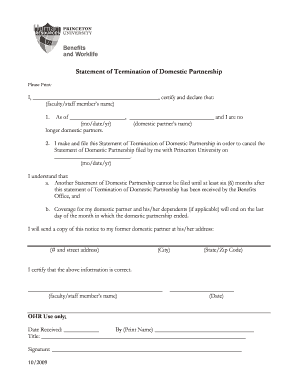
As of , and I are no (mo/date/yr) (domestic partner s name) longer domestic partners. 2. I make and file this Statement of Termination of Domestic Partnership in order to cancel the Statement of Domestic Partnership filed by me with Princeton University on . (mo/date/yr) I understand that: a. Another Statement of Domestic Partnership cannot be filed until at least six (6) months after this statement of Termination of D.

How it works

  1. Open form

    Open form follow the instructions

  2. Easily sign form

    Easily sign the form with your finger

  3. Share form

    Send filled & signed form or save

How to fill out the Domestic Partnership Form online

Completing the Domestic Partnership Form online is a straightforward process that allows you to formally declare the termination of your domestic partnership. This guide provides clear, step-by-step instructions to help you navigate each section of the form with ease.

Follow the steps to fill out the Domestic Partnership Form online.

  1. Click ‘Get Form’ button to obtain the form and open it in the editor.
  2. In the first section, enter your name where prompted, ensuring that it matches your legal documents. This identifies you as the faculty or staff member submitting the form.
  3. Next, input the date when your domestic partnership officially ended. Format it as month/day/year to ensure clarity.
  4. Provide the name of your former domestic partner in the designated field to confirm the relationship being terminated.
  5. Indicate the date on which you filed the original Statement of Domestic Partnership with Princeton University. This is crucial for processing your termination.
  6. Review the statements regarding the constraints on filing another domestic partnership and the coverage end date for dependents. Acknowledge your understanding by checking the appropriate boxes if required.
  7. Fill in your former domestic partner's address, including the street address, city, state, and zip code to ensure they receive a copy of the notice.
  8. Finally, certify the information by signing and dating the form. This confirms that all details provided are accurate.
  9. Once completed, you can save changes, download, print, or share the form as needed.

Start completing your Domestic Partnership Form online to ensure a smooth process.

Get form

Experience a faster way to fill out and sign forms on the web. Access the most extensive library of templates available.
Get form

Related content

Domestic Partnership Form & Fees - California...
How to Submit Domestic Partnership Forms ... Completed forms can be mailed to California...
Learn more
AFFIDAVIT OF DOMESTIC PARTNERSHIP 1
G:\Departments\Human Resources\Web Site\Benefits & Compensation\FORMS\Domestic...
Learn more
Domestic partnership in Wisconsin - Wikipedia
Wisconsin ended its domestic partnership registry on April 1, 2018. Wisconsin was the...
Learn more

Related links form

OR Form 40 2012 CATERING AUTHORITY REQUEST / TYPE 222 Deliver Or ... OR Restraining Order To Prevent Abuse - County Of Clackamas 2011 NE ESU 7 Management Training Program (MTP) Registration Form 2012

Questions & Answers

Get answers to your most pressing questions about US Legal Forms API.

Contact support

Marriages and domestic partnerships share a great deal of similarities, but they differ when it comes to the legal rights they provide. California law defines marriage as a civil contract of a personal relationship of two consenting adults, while a domestic partnership centers more around a couple that shares a ...

A domestic partner can be broadly defined as an unrelated and unmarried person who shares common living quarters with an employee and lives in a committed, intimate relationship that is not legally defined as marriage by the state in which the partners reside.

If you and your partner are over 18, or one or both partners are under 18 and have obtained a court order granting permission to establish a domestic partnership, and meet the requirements of California Family Code section 297, you may register a domestic partnership with the California Secretary of State.

Someone you are legally married to is a spouse.

Domestic partners file separate federal tax returns California domestic partners file as individuals for federal filing, however, under California law, the state return must be filed as a married return. This requires the creation of a “mock” federal return that reflects joint-filing status.

You cannot add your girlfriend to your health insurance plan as there is no legal or financial obligation between you and your girlfriend. If you can get health insurance for a domestic partner, you will likely need to sign an affidavit confirming that you meet the criteria of a domestic partnership.

* The fee for filing a domestic partnership is $33.00 if both partners are under the age of 62. ** The fee for filing a domestic partnership is $10.00 if either partner is 62 or older.

A domestic partnership shall be established in California when both persons file a Declaration of Domestic Partnership (Form DP-1) with the Secretary of State.

Get This Form Now!

Use professional pre-built templates to fill in and sign documents online faster. Get access to thousands of forms.
Get form
If you believe that this page should be taken down, please follow our DMCA take down processhere.
Get Domestic Partnership Form
Get form
  • Adoption
  • Bankruptcy
  • Contractors
  • Divorce
  • Home Sales
  • Employment
  • Identity Theft
  • Incorporation
  • Landlord Tenant
  • Living Trust
  • Name Change
  • Personal Planning
  • Small Business
  • Wills & Estates
  • Packages A-Z
  • Affidavits
  • Bankruptcy
  • Bill of Sale
  • Corporate - LLC
  • Divorce
  • Employment
  • Identity Theft
  • Internet Technology
  • Landlord Tenant
  • Living Wills
  • Name Change
  • Power of Attorney
  • Real Estate
  • Small Estates
  • Wills
  • All Forms
  • Forms A-Z
  • Other Templates
  • Legal Hub
  • About Us
  • Help Portal
  • Legal Resources
  • Blog
  • Affiliates
  • Contact Us
  • Delete My Account
  • Site Map
  • Industries
  • Forms in Spanish
  • Localized Forms
  • State-specific Forms
  • Forms Kit
  • Real Estate Handbook
  • All Guides
  • Notarize
  • Incorporation services
  • For Consumers
  • For Small Business
  • For Attorneys
  • USLegal
  • FormsPass
  • pdfFiller
  • signNow
  • altaFlow
  • DocHub
  • Instapage
Form Packages
  • Adoption
  • Bankruptcy
  • Contractors
  • Divorce
  • Home Sales
  • Employment
  • Identity Theft
  • Incorporation
  • Landlord Tenant
  • Living Trust
  • Name Change
  • Personal Planning
  • Small Business
  • Wills & Estates
  • Packages A-Z
Form Categories
  • Affidavits
  • Bankruptcy
  • Bill of Sale
  • Corporate - LLC
  • Divorce
  • Employment
  • Identity Theft
  • Internet Technology
  • Landlord Tenant
  • Living Wills
  • Name Change
  • Power of Attorney
  • Real Estate
  • Small Estates
  • Wills
  • All Forms
  • Forms A-Z
  • Other Templates
Customer Service
  • Legal Hub
  • About Us
  • Help Portal
  • Legal Resources
  • Blog
  • Affiliates
  • Contact Us
  • Delete My Account
  • Site Map
  • Industries
  • Forms in Spanish
  • Localized Forms
  • State-specific Forms
  • Forms Kit
Legal Guides
  • Real Estate Handbook
  • All Guides
Prepared for you
  • Notarize
  • Incorporation services
Our Customers
  • For Consumers
  • For Small Business
  • For Attorneys
Our Sites
  • USLegal
  • FormsPass
  • pdfFiller
  • signNow
  • altaFlow
  • DocHub
  • Instapage
Social Media
Call us now toll free:
+1 833 426 79 33
As seen in:
© Copyright 1999-2026 airSlate Legal Forms, Inc. 17 Station Street, Ste. 203, Brookline, MA 02445
  • Your Privacy Choices
  • Terms of Service
  • Privacy Notice
  • Content Takedown Policy
  • Bug Bounty Program