Loading
Form preview
  • US Legal Forms
  • Other Templates
  • More Forms
  • More Multi-State Forms
  • Indian Army Fireman

Get Indian Army Fireman

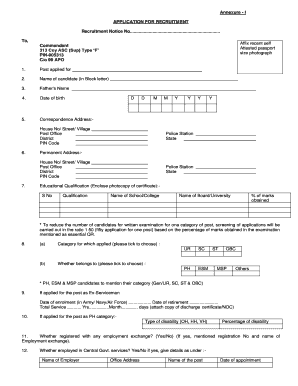
Annexure I APPLICATION FOR RECRUITMENT Recruitment Notice No........................................................................ To,Affix recent self Attested passport size photographCommandant.

How it works

  1. Open form

    Open form follow the instructions

  2. Easily sign form

    Easily sign the form with your finger

  3. Share form

    Send filled & signed form or save

How to fill out the Indian Army Fireman online

Completing the Indian Army Fireman application form online can be a straightforward process with the right guidance. This guide provides clear steps to assist you in accurately filling out the application to enhance your chances of recruitment.

Follow the steps to successfully complete the application process.

  1. Click the ‘Get Form’ button to obtain the application form and open it for editing.
  2. In the first section, specify the 'Post applied for' clearly.
  3. Enter your name in block letters as requested in the designated field.
  4. Fill in your father's name in the provided space to ensure validity.
  5. Indicate your date of birth according to the format specified in the application.
  6. Provide your correspondence address in detail, including house number, street, village, post office, district, and PIN code.
  7. Repeat the process for your permanent address with the same level of detail.
  8. List your educational qualifications, enclosing photocopies of your relevant certificates, and include the percentage of marks obtained for each.
  9. Tick the appropriate category for which you are applying (UR, SC, PH, ESM, ST, OBC) and specify if you belong to any special categories.
  10. Complete relevant sections if you are applying as an Ex-Serviceman, noting enrollment and retirement dates along with total service duration.
  11. If applicable, indicate your disability type and percentage if applying under the PH category.
  12. Confirm whether you are registered with any employment exchange, providing registration details if applicable.
  13. Indicate if you are currently employed in Central Government services, and provide necessary details if yes.
  14. Complete the declaration section by signing and dating it, affirming the truthfulness of the information provided.
  15. Finally, review the completed application for accuracy. Once satisfied, you may save changes, download, print, or share the form as needed.

Take the next step towards your career in the Indian Army by completing your application online today!

Get form

Experience a faster way to fill out and sign forms on the web. Access the most extensive library of templates available.
Get form

Related content

Columbus Firefighter ~ Fire Selection Process
Columbus Firefighter ~ Fire Selection Process ... United States Code Armed Forces (Army...
Learn more
The Use of Robotics in Firefighting | EKU Online
Fixed firefighting robotic systems, like automatic fire sprinklers and alarms,...
Learn more
Firefighter - Wikipedia
A firefighter is a rescuer extensively trained in firefighting, primarily to extinguish...
Learn more

Related links form

PROJECT LPG TERMINAL Tender Document For Civil Works - Hindustan Petroleum Corporation ... Providing Vehicles (of Various Categories) On Hire ... - GAIL (India) Ltd. SALEM 636 011, TAMILNADU

Questions & Answers

Get answers to your most pressing questions about US Legal Forms API.

Contact support

The candidates eligible for Army Ordnance Corps AOC Recruitment 2023 must have to submit their online application forms at the official website at https://aocrecruitment.gov.in/.

The salary for The Firemen Recruitment 2023, Decided by Manipur firemen department Manipur Pay Rules....Manipur Firemen Salary 2023: PostBasic salaryFiremen5200 to 202301 more row • 23 Mar 2023

The proposal is for a new AoC membership fee structure “of a single fee per college set at 0.1 per cent of turnover with a reduced rebate for the largest colleges”.

Alexandria Ocasio-Cortez (/oʊˌkɑːsioʊ kɔːrˈtɛz/; born October 13, 1989), also known by her initials as AOC, is an American democratic socialist politician and activist. She became the U.S. Representative for New York's 14th congressional district in 2019.

Ocasio-Cortez graduated cum laude from Boston University in 2011 with a Bachelor of Arts degree in both international relations and economics.

CLICK HERE TO JOIN Once you sign up you will receive an email from info@crows.org to activate your account. Please be sure to add info@crows.org to your safe senders list. Guests must activate their account prior to registering for an event or make any transactions.

Get This Form Now!

Use professional pre-built templates to fill in and sign documents online faster. Get access to thousands of forms.
Get form
If you believe that this page should be taken down, please follow our DMCA take down processhere.
Get Indian Army Fireman
Get form

Form categories

Real Estate
  • Home Sale
  • Deeds
  • Leases
  • Landlord Tenant
  • First Refusal Agreement
  • Lis Pendens
  • View all Real Estate
Business & Commercial
  • Small Business
  • Contracts
  • Construction
  • Employment
  • Limited Liability Company
  • Partnerships
  • View all Business & Commercial
Estate Planning
  • Personal Planning
  • Last Will and Testament
  • Living Trust
  • Power of Attorney
  • Living Will (Healthcare Directive)
  • Probate
  • Trusts
  • Small Estate
  • View all Estate Planning

Other Legal Areas

  • Civil Actions
  • Civil Procedure
  • Animals
  • Affidavits
  • Bill of Sale
  • Oil Gas and Minerals
  • Name Change
  • Other
Family Law
  • Divorce
  • Annulment
  • Adoption
  • Marriage
  • Child Justice
  • View all Family Law
  • Forms Catalog
  • Other Templates

Company

  • About Us
  • Pricing
  • Legal Hub
  • Affiliate Program

Knowledge Base

  • Help Portal
  • Legal Resources
  • Blog
  • Industries
  • Legal Guides
  • Sitemap

Services

  • Notarize
  • Form Selector

Support

  • Contact Us
  • Delete My Account

Products

  • USLegal
  • FormsPass
  • pdfFiller
  • signNow
  • altaFlow
  • DocHub
  • Instapage
Social Media
Call us now toll free:
+1 833 426 79 33
As seen in:
© 2026 US Legal Forms. All rights reserved.
  • Your Privacy Choices
  • Terms of Service
  • Privacy Notice
  • Content Takedown Policy
  • Bug Bounty Program