Loading
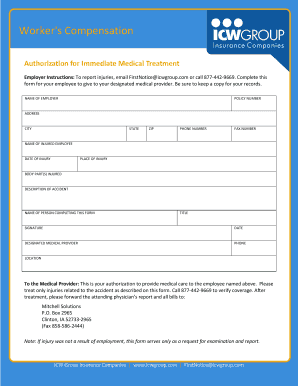
Get Icw Group - Medical Treatment Authorization Form
How it works
-

Open form follow the instructions
-

Easily sign the form with your finger
-

Send filled & signed form or save
How to fill out the ICW Group - Medical Treatment Authorization Form online
The ICW Group - Medical Treatment Authorization Form is essential for facilitating medical treatment for injured employees. This guide will provide you with clear and detailed instructions on how to fill out this form online, ensuring a smooth and efficient process.
Follow the steps to complete the form accurately.
- Click the ‘Get Form’ button to obtain the authorization form and open it in your online editor.
- Fill in the 'Name of Employer' field with the legal name of the employer responsible for the insurance coverage.
- Enter the 'Policy Number' associated with the employer's workers' compensation insurance.
- Provide the 'Address' of the employer, ensuring to include street address details.
- Complete the 'City,' 'State,' and 'ZIP' code fields with the appropriate information for the employer's location.
- Input the 'Phone Number' of the employer for contact purposes.
- Fill in the 'Fax Number' if applicable, to facilitate the sharing of documents.
- Document the 'Name of Injured Employee' as it appears on their identification or employment records.
- State the 'Date of Injury' precisely, using the format MM/DD/YYYY.
- Describe the 'Place of Injury' where the incident occurred, providing as much detail as needed.
- Specify the 'Body Part(s) Injured' to ensure accurate treatment.
- Provide a detailed 'Description of Accident' to give context to the medical provider.
- Enter the 'Name of Person Completing This Form' to identify who is responsible for the submission.
- Include the 'Title' of the person completing the form for reference.
- Sign the form in the 'Signature' field, affirming the accuracy of the information provided.
- Input the 'Date' when the form is being completed to establish a timeline.
- Specify the 'Designated Medical Provider' who will be treating the injured employee.
- Fill in the 'Phone' and 'Location' of the designated medical provider for easy communication.
- Once all fields are completed, review the form for accuracy and clarity.
- Save changes, then choose to download, print, or share the completed form as needed.
Complete your forms online confidently and ensure timely medical treatment.