Loading
Get Naptosa Gap Cover
How it works
-

Open form follow the instructions
-

Easily sign the form with your finger
-

Send filled & signed form or save
How to fill out the Naptosa Gap Cover online
Filling out the Naptosa Gap Cover form online can be a straightforward process when you understand the components involved. This guide will provide you with a step-by-step approach to ensure your application is filled out accurately and efficiently.
Follow the steps to complete your Naptosa Gap Cover application
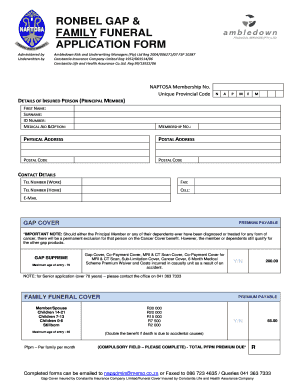
- Click the ‘Get Form’ button to obtain the Naptosa Gap Cover form and open it for editing.
- Begin by entering your Naptosa Membership Number and Unique Provincial Code in the designated fields. This information helps to identify your application.
- In the 'Details of Insured Person' section, provide the first name, surname, ID number, and medical aid information of the principal member.
- Fill in the physical and postal address sections accurately, including postal codes.
- Complete the contact details by providing both work and home telephone numbers, as well as a cell phone number and email address.
- Indicate the applicable Gap Cover options by checking the boxes for the coverage you wish to apply for, including Gap Supreme, and be mindful of the age limit for entry.
- For family funeral cover, specify the premium payable for each family member, indicating their relationship and amount chosen based on age ranges.
- List each insured person's details, including name, sex, age, and ID number, ensuring that the defined criteria for eligible children are adhered to.
- Enter the nominated beneficiary's name, contact details, and ID number if applying for funeral cover.
- Complete the debit order authorization by selecting a preferred date and filling in the bank account details required for automatic payment.
- Review your form for accuracy, then save any changes made.
- Finally, download, print, or share the completed form as required, and submit it via email or fax using the provided information.
Start completing your Naptosa Gap Cover form online today for peace of mind in securing your coverage.
There is an automatic three-month general waiting period for all healthcare services and treatment, except authorised emergency hospital admissions.