Loading
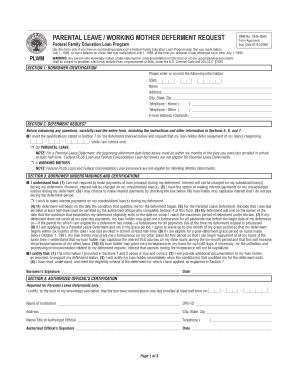
Get Army Paternity Leave Da31
How it works
-

Open form follow the instructions
-

Easily sign the form with your finger
-

Send filled & signed form or save
How to fill out the Army Paternity Leave Da31 online
Filing for paternity leave can be a crucial step for new parents serving in the Army. This guide provides comprehensive steps for filling out the Army Paternity Leave Da31 online, ensuring you understand each section and complete the form accurately.
Follow the steps to successfully complete the Army Paternity Leave Da31 online.
- Click the ‘Get Form’ button to obtain the Army Paternity Leave Da31 and open it for editing.
- In the first section, provide your personal information, including your name, social security number, and contact details. Make sure to verify that all entries are correct.
- Proceed to the deferment request section. Check the box indicating you are taking paternity leave, and ensure the deferment date aligns with your military policy requirements.
- In the borrower understandings and certifications section, read through the eligibility statements carefully. Then, certify your understanding by signing and dating where indicated.
- If required for your situation, ensure that an authorized official completes the certification section, confirming your enrollment at an educational institution.
- Review all sections of the completed form for any errors or omissions to ensure that you have filled out every necessary field.
- After confirming that all details are accurate, save your changes, download the completed form, and print it for submission.
- Finally, submit the Army Paternity Leave Da31 along with any required documentation to the specified address as outlined in the instructions.
Start your journey towards parental leave by completing the Army Paternity Leave Da31 online today.
0:27 4:13 How to Fill Out DA-31 Form (Request and Authority for Leave) Online YouTube Start of suggested clip End of suggested clip Information may lead to your commander rejecting your leave request. Only you can complete andMoreInformation may lead to your commander rejecting your leave request. Only you can complete and submit the form to your commander. To begin filling out this document.