Loading
Get Pta/booster Fundraising Permission Request - Leander Isd
How it works
-

Open form follow the instructions
-

Easily sign the form with your finger
-

Send filled & signed form or save
How to fill out the PTA/Booster Fundraising Permission Request - Leander ISD online
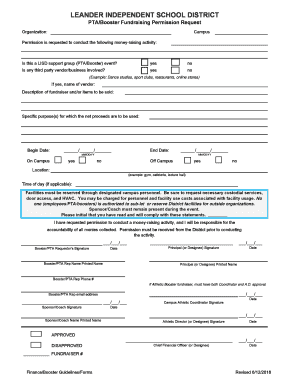
The PTA/Booster Fundraising Permission Request form for Leander Independent School District is an essential document for securing approval to conduct fundraising activities. This guide provides clear, step-by-step instructions on how to navigate and complete the form online.
Follow the steps to successfully complete your fundraising permission request.
- Click ‘Get Form’ button to obtain the form and open it in the editor.
- Begin by filling out the organization name and the campus where the fundraising event will take place.
- Indicate whether the activity is a LISD support group (PTA/Booster) event by selecting 'yes' or 'no'.
- If a third-party vendor or business is involved, answer 'yes' or 'no'. If yes, specify the vendor's name.
- Provide a description of the fundraiser and the items that will be sold.
- Outline the specific purposes for which the net proceeds will be used.
- Fill in the start and end dates for the fundraising event following the MM/DD/YY format.
- Specify whether the event will take place on campus or off campus by selecting 'yes' or 'no' for each option.
- If the event is on campus, indicate the location (e.g., gym, cafeteria) and the time of day if applicable.
- Read the statements regarding facility use, ensure comprehension, and initial to confirm compliance.
- Sign and date the form as the Booster/PTA requestor, and ensure the principal (or designee) also signs and dates the form.
- If applicable for athletic booster fundraisers, ensure both the coordinator and athletic director approvals are obtained.
- Complete the remaining sections, including printed names, phone numbers, and email addresses.
- Once all fields are completed, save changes, download, print, or share the form as necessary.
Get started today and complete your PTA/Booster fundraising permission request online.