Loading
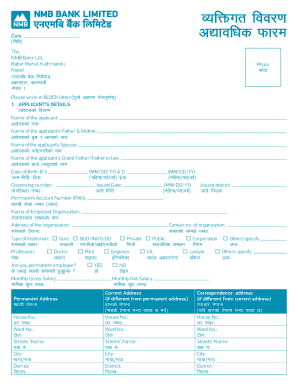
Get Nmb Kyc Form Engnepali Rev.indd
How it works
-

Open form follow the instructions
-

Easily sign the form with your finger
-

Send filled & signed form or save
How to fill out the NMB KYC Form EngNepali Rev.indd online
This guide provides comprehensive instructions on how to complete the NMB KYC Form EngNepali Rev.indd online. Whether you are a first-time user or looking for assistance, this resource aims to clarify each part of the form and the filling process.
Follow the steps to successfully fill out the NMB KYC Form online.
- Press the ‘Get Form’ button to access the NMB KYC Form EngNepali Rev.indd and open it in your preferred editor.
- Fill in the applicant's details section. This includes your name, date of birth, citizenship number, and other required identifiers. Ensure that all information is accurate and written in block letters.
- Provide details about your parents, spouse, and any other relevant family members, as applicable. Each name must be filled out carefully to avoid errors.
- Enter your employment details, including the name and address of your organization. Specify if you are a permanent employee and mention your monthly gross and net salary.
- Complete the current and permanent address sections. If either differs, ensure that you indicate the appropriate details clearly, including house and ward numbers.
- Include contact information. Fill out your mobile number and email address for further communication.
- For secondary contact details, provide names, addresses, and mobile numbers as required. This should include both primary and secondary contact persons.
- Lastly, add your account number with NMB Bank. Review all entries for accuracy before submitting the form.
- Once all information is completed accurately, you can save your changes, download the form, print it, or share it as necessary.
Complete your NMB KYC Form EngNepali Rev.indd online today!