Loading
Get Canada Wes Formulaire De Demande De Releve De Notes 2020-2026
How it works
-

Open form follow the instructions
-

Easily sign the form with your finger
-

Send filled & signed form or save
How to fill out the Canada WES Formulaire De Demande De Releve De Notes online
The Canada WES Formulaire De Demande De Releve De Notes is essential for applicants seeking to have their academic transcript sent to World Education Services. This guide provides clear, step-by-step instructions for completing the form online and ensuring all necessary details are accurately captured.
Follow the steps to effectively complete the online form.
- Click ‘Get Form’ button to obtain the form and open it in the editor.
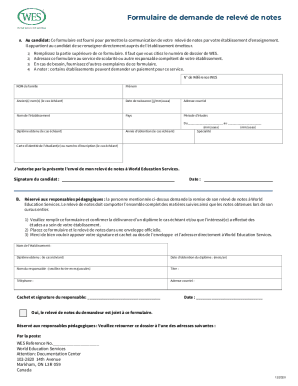
- Fill in the upper section of the form where you will need to provide your WES reference number. This is crucial for tracking your application.
- Enter your last name, first name, and any previous names if applicable. Ensure that the spelling is correct to avoid complications.
- Provide your date of birth in the format of day/month/year.
- Input your email address. This is important for receiving updates concerning your application.
- Indicate the name of the educational institution you attended.
- Specify the country of your institution.
- Detail the period of your studies by filling in the start and end dates (month/year) for your education.
- If applicable, indicate the specialty and the degree obtained during your studies.
- Include your student identification card number, if you have one.
- Authorize the sending of your transcript to World Education Services by signing and dating the form.
- After completing the form, review all entries for accuracy before proceeding. You may save changes, download, print, or share the form as needed.
Submit your completed documents online to ensure a smooth processing experience.