Loading
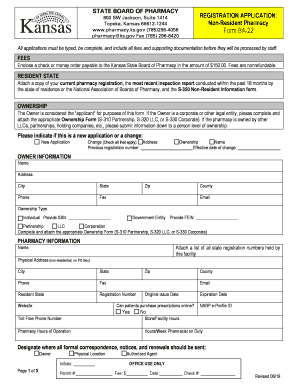
Get Ks Form Ba-22 2019-2026
How it works
-

Open form follow the instructions
-

Easily sign the form with your finger
-

Send filled & signed form or save
How to fill out the KS Form BA-22 online
The KS Form BA-22 is a crucial document for non-resident pharmacies seeking registration in Kansas. This guide will walk you through the process of completing the form online, ensuring that you provide all necessary information accurately and completely.
Follow the steps to successfully complete the KS Form BA-22 online.
- Click the ‘Get Form’ button to access the KS Form BA-22 and open it in your digital editor.
- Begin by providing your ownership information. Indicate whether the owner is an individual or a corporate entity, and attach the appropriate ownership form as required.
- Next, fill out the pharmacy information, ensuring to include the pharmacy’s physical address, registration numbers, and contact details. Verify that all fields are accurate to avoid processing delays.
- Complete the authorized resident agent information section. Include the name, title, and contact details for the responsible agent in Kansas.
- Specify the type of pharmacy by checking the relevant options—such as retail or mail order—and provide any necessary drug schedules if applicable.
- Address the disciplinary information by answering all relevant questions honestly. If applicable, make sure to attach the required Form S-300 for your disciplinary history.
- List all licensed pharmacists currently employed at the pharmacy. Ensure you have their names and license numbers ready for accurate completion.
- Review the PIC (pharmacist-in-charge) certification and owner certification sections. Ensure that signatures and dates are provided as required before submission.
- Finally, save your changes, then download, print, or share the completed KS Form BA-22 as needed for submission.
Get started on your application today by filling out the KS Form BA-22 online.
If you are the new owner of a registered pharmacy, complete and submit a notification of change of ownership of a registered pharmacy form - (on click the document will attempt to download automatically) to notify us that the ownership of a registered pharmacy has changed.