Loading
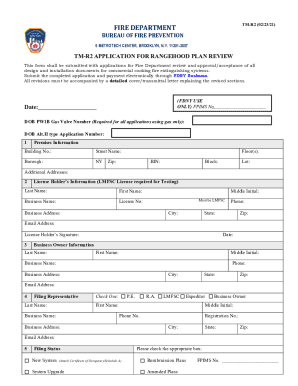
Get Ny Tm-r2 (formerly Tmr-2) 2021
How it works
-

Open form follow the instructions
-

Easily sign the form with your finger
-

Send filled & signed form or save
How to fill out the NY TM-R2 (Formerly TMR-2) online
Filling out the NY TM-R2 form is an important step in obtaining Fire Department approval for commercial cooking fire extinguishing systems. This guide provides clear instructions to help users complete the form accurately, ensuring a smooth submission process.
Follow the steps to successfully complete the NY TM-R2 form online.
- Click ‘Get Form’ button to obtain the form and open it in the editor.
- Fill in the Premises Information section. Provide building number, street name, borough, floor(s), zip code, BIN, block, and lot. If there are additional addresses relevant to the application, include those as well.
- Complete the License Holder’s Information section. Enter the last name, first name, business name, and license number (must be LMFSC). Include the business address, city, phone number, state, zip code, and email address. The license holder must sign this section.
- In the Business Owner Information section, provide similar details as requested for the license holder: last name, first name, middle initial, business name, phone number, business address, city, state, zip, and email address.
- Fill out the Filing Representative section, providing the last name, first name, business name, phone number, business address, and registration number. Check the box identifying the role: P.E., R.A., LMFSC, or Expeditor.
- Indicate the Filing Status. Check the appropriate box for new system, system upgrade, resubmission plans, or amended plans. Ensure to attach the Certificate of Occupancy if submitting for a new system.
- Provide a job description and the location of the work to be performed in the specified section.
- Upload the legible stamp of P.E., R.A., or LMFSC as required.
- Complete the Asbestos Abatement Compliance section. Choose the correct option and attach the necessary documentation.
- Ensure the Business Owner Statement & Signature section is filled out by printing the name, signing, and dating the form. The business owner must attest to the accuracy of the information provided.
- Review the application for completeness and accuracy, ensuring all required fields are filled. Save changes, download, print, or share the completed form as necessary.
Complete and submit your NY TM-R2 form online to ensure timely processing of your application.
Get form
Experience a faster way to fill out and sign forms on the web. Access the most extensive library of templates available.
Get This Form Now!
Use professional pre-built templates to fill in and sign documents online faster. Get access to thousands of forms.