Loading
Get Marketplace Appeal Request Form 2019-2026
How it works
-

Open form follow the instructions
-

Easily sign the form with your finger
-

Send filled & signed form or save
How to fill out the Marketplace Appeal Request Form online
Completing the Marketplace Appeal Request Form is an important step for users wishing to contest a Marketplace eligibility determination. This guide provides clear, step-by-step instructions to help you fill out the form accurately and effectively while filing online.
Follow the steps to successfully complete your appeal request form.
- Click ‘Get Form’ button to obtain the form and open it in the editor.
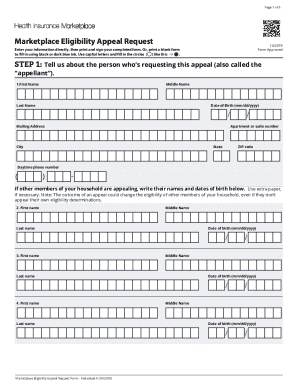
- Begin by entering your information as the person requesting the appeal, including your first name, middle name, last name, date of birth, mailing address, and daytime phone number. If other individuals in your household are appealing, list their names and dates of birth as well.
- Select your preferred method for receiving electronic updates about your appeal. Choose between text reminders, email reminders, or indicate that you do not wish to receive reminders.
- Indicate the date of the notice you are appealing and provide your application ID number. Select the reasons for your appeal from the options provided. If none apply, provide additional information in the space provided.
- If you need an expedited appeal due to urgent health concerns, select this option and explain your reasons for the expedited request in the designated space.
- All adults who are signing the form must provide a signature along with their printed name and date. Ensure that each adult member of the household who is 18 or older authorizes the release of their federal tax and Social Security information.
- Review all provided information for accuracy and completeness. After confirming that the form is filled out correctly, proceed to print, save changes, or share the completed form as needed.
Complete your Marketplace Appeal Request Form online today to ensure your appeal is processed efficiently.
Log into your Marketplace account. Under Your Existing. Click Application Details in the menu on the left side. Choose a document type. from the drop-down menu. Click Select File to Upload. Locate and select the document on your computer. Click Upload.