Loading
Get Ny Rb-89.1 2018-2026
How it works
-

Open form follow the instructions
-

Easily sign the form with your finger
-

Send filled & signed form or save
How to fill out the NY RB-89.1 online
Filling out the NY RB-89.1 form can be straightforward when you have the right guidance. This comprehensive guide will walk you through the necessary steps to complete this form online, ensuring you provide all required information accurately.
Follow the steps to effectively complete the NY RB-89.1 form.
- Click the ‘Get Form’ button to obtain the form and open it in your preferred online editor.
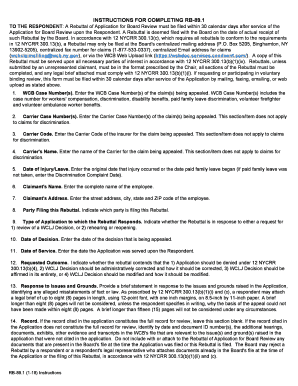
- Enter the WCB Case Number(s) from the claim(s) you are appealing in the designated field.
- Input the Carrier Case Number(s) for the claim(s). Note that this is not applicable for discrimination claims.
- Fill in the Carrier Code associated with the insurer for the claim you are appealing. This section does not apply to discrimination claims.
- Provide the name of the Carrier for the claim being appealed.
- Record the date of the injury or the start of paid family leave in the specified format.
- Input the full name of the claimant in the appropriate section.
- Enter the complete street address, including city, state, and ZIP code of the claimant.
- Indicate which party is filing the Rebuttal in the designated space.
- Specify the type of application the Rebuttal responds to, selecting either a review of a WCLJ Decision or a rehearing/reopening.
- Fill in the date of the decision you are appealing.
- Record the date when the Application was served upon you.
- Select the requested outcome, indicating whether the application should be denied, corrected, affirmed, or modified.
- Provide a brief statement responding to the issues raised in the application and optionally attach a legal brief that follows length requirements.
- If necessary, detail additional evidence relevant to the appeal that was not cited before.
- Specify any objections or exceptions regarding the ruling that you wish to modify.
- Indicate if you are requesting an increase in attorney's fees, and note that additional forms may be required.
- Sign and date the certification section, providing your details, affirming the Rebuttal's good faith basis.
- Complete the proof of service section, ensuring that the Rebuttal is served to all necessary parties within the appropriate timeframe.
- Once all sections are filled out, you can save the changes, download, print, or share the completed form as required.
Complete your NY RB-89.1 form online today for a seamless filing experience.
Related links form
Boulevard Marketing Permit Application (Former ... - City Of Toronto
PREO301U Application For An Update To The ... - Elections Ontario - Elections On
PHYS 331 Presentation Grading Form Fall 2012 Project ... - People - People Ok Ubc
Development Variance Permit Application - City Of Kamloops - Kamloops