Loading
Get Hi Ociss 105 2018-2026
How it works
-

Open form follow the instructions
-

Easily sign the form with your finger
-

Send filled & signed form or save
How to fill out the HI OCISS 105 online
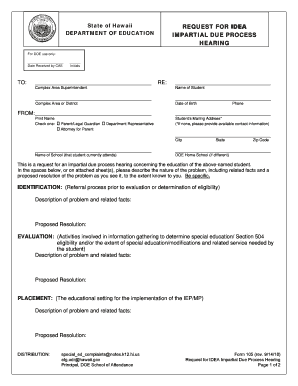
The HI OCISS 105 is a crucial document for initiating a request for an impartial due process hearing regarding a student's education under the Individuals with Disabilities Education Act. Filling out this form accurately is essential for ensuring that your concerns are addressed effectively.
Follow the steps to complete the HI OCISS 105 online successfully.
- Click ‘Get Form’ button to obtain the form and open it in the editor.
- Begin by entering the name of the student in the appropriate section, ensuring that it is spelled correctly. Next, fill in the date of birth and the complex area or district where the student is enrolled.
- Indicate your relationship to the student by checking the relevant box, whether you are a parent/legal guardian, department representative, or attorney for the parent. Provide your printed name and contact phone number.
- Enter the mailing address for the student. If the student does not have a mailing address, provide any available contact information. Complete the city, state, and zip code fields.
- Specify the name of the school the student currently attends, and, if different, list the Department of Education home school.
- Detail the nature of the problem in the identification section. Be specific about the facts and include a proposed resolution based on your understanding of the situation.
- In the evaluation section, describe any related facts associated with the student’s educational needs and propose resolutions accordingly.
- In the placement section, outline any issues regarding the educational setting and how they impact the student's education. Provide proposed resolutions once again.
- Detail issues regarding the provision of a free appropriate public education and offer proposed resolutions in that section.
- Decide on your preference regarding a resolution session and indicate your choice by initialing the appropriate option. Provide any additional information as necessary, including your need for an interpreter or if you will be accompanied by an attorney or parent advocate.
- Finally, ensure that you sign and date the form. Review all entries for accuracy before submission.
- Once the form is complete, you can save your changes, download a copy for your records, print the document, or share it as needed.
Complete your forms online to ensure accurate and timely processing.
Related links form
'Iolani School #1 Best Private High Schools in Hawaii.