Loading
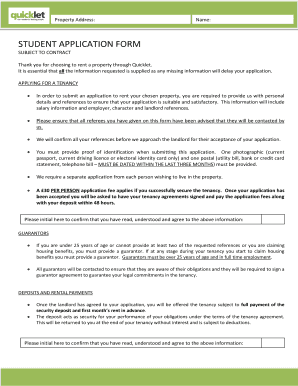
Get Student Application Form - Quicklet
How it works
-

Open form follow the instructions
-

Easily sign the form with your finger
-

Send filled & signed form or save
How to fill out the STUDENT APPLICATION FORM - Quicklet online
Filling out the STUDENT APPLICATION FORM - Quicklet online can seem daunting, but this guide breaks down each section to help you complete your application smoothly. By providing accurate information, you ensure a timely processing of your application.
Follow the steps to complete your application efficiently.
- Click ‘Get Form’ button to obtain the STUDENT APPLICATION FORM and open it in the editor.
- Begin by entering the property address you wish to rent. Provide accurate details about the property to avoid confusion.
- Fill in your personal details in the 'About You' section including your title, first name, surname, date of birth, landline, mobile phone number, and email address.
- Provide your current address and specify how long you have lived there. Include your reasons for leaving the property.
- Indicate your living situation by selecting the appropriate option, such as property owner or housing executive tenant. Answer questions related to smoking and pets, if applicable.
- In the 'University' section, enter the name of the university you attend, your current course of study, and your year of study for the upcoming September.
- Complete the 'Your Landlord Details' section by providing information about your current or previous landlord, including their name, contact number, and property address.
- Fill out your employment details, which includes your employer's name, address, and contact details, along with your job title and salary information.
- Provide the information for a personal reference, ensuring that this individual is not a relative or your current employer.
- If required, fill in the guarantor details, ensuring they meet the necessary criteria. Provide all requested information regarding the guarantor’s employment and relationship to you.
- Share next of kin details, including their contact information for emergencies.
- Confirm the condition of the property before viewing it by selecting 'Yes' or 'No' and providing any additional comments if needed.
- If you have not viewed the property, sign the disclaimer acknowledging your acceptance of the property’s current condition.
- Review the insurance section and check the box if you do not wish to be contacted by an insurance provider.
- Include all required documents such as photographic identification and proof of residency dated within the last three months, along with the application fee.
- Finally, read the declaration, sign it, and enter the date before submitting your application.
Complete your STUDENT APPLICATION FORM - Quicklet online today to ensure your application is processed without delay.
The California Fair Employment and Housing Act (FEHA) prohibits any non-job-related inquiries of applicants or employees, either verbally or through the use of an application form, that express, directly or indirectly a limitation, specification or discrimination as to race, religious creed, color, national origin, ...