We use cookies to improve security, personalize the user experience, enhance our marketing activities (including cooperating with our marketing partners) and for other business use.
Click "here" to read our Cookie Policy. By clicking "Accept" you agree to the use of cookies. Read less
Read more
Accept
Loading
Form preview
  • US Legal Forms
  • Form Library
  • More Forms
  • More Multi-State Forms
  • Instructions On Filling Out A Water Pumpage Data Report

Get Instructions On Filling Out A Water Pumpage Data Report

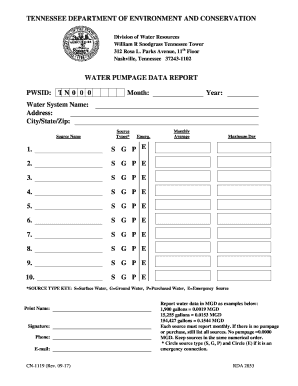
TENNESSEE DEPARTMENT OF ENVIRONMENT AND CONSERVATION Division of Water Resources William R Snodgrass Tennessee Tower 312 Rosa L. Parks Avenue, 11th Floor Nashville, Tennessee 372431102WATER PUMPAGE.

How it works

  1. Open form

    Open form follow the instructions

  2. Easily sign form

    Easily sign the form with your finger

  3. Share form

    Send filled & signed form or save

How to fill out the instructions on filling out a water pumpage data report online

Completing the water pumpage data report is essential for documenting your water usage accurately. This guide will provide you with clear and supportive instructions in filling out the report online, ensuring that you understand each section and field.

Follow the steps to accurately fill out the water pumpage data report online.

  1. Press the ‘Get Form’ button to access the water pumpage data report and open it in the online editor.
  2. Enter the PWSID, which is the public water system identification number, following the format 'TN' followed by seven digits (e.g., TN0000150).
  3. Type or print the month during which the water was pumped, purchased, or treated.
  4. Type or print the year when the water was pumped, purchased, or treated.
  5. Provide the legal name of your water system by typing or printing it.
  6. Input the mailing address, including the street, road, or post office box number.
  7. Fill in the city, state, and zip code used for correspondence.
  8. List the sources by number, starting with the main source as number 1, followed by backup and emergency sources.
  9. Type or print the name of each water source corresponding to the listed source numbers.
  10. Select the source type by circling the appropriate letter: 'G' for Ground Water, 'S' for Surface Water, 'P' for Purchased Water. Circle 'E' if it is an emergency connection.
  11. Calculate the monthly average by adding the daily total volume of water pumped each day of the month, and then dividing that total by the number of days recorded.
  12. Record the maximum pumpage recorded on the highest usage day for each source during the month.
  13. If there were no pumpage or water purchased, still report all sources with '0.0000 MGD' for those not used.
  14. Save your changes, and choose to download, print, or share the completed form as needed.

Complete your water pumpage data report online today to ensure your records are accurate and compliant.

Get form

Experience a faster way to fill out and sign forms on the web. Access the most extensive library of templates available.
Get form

Related content

INSTRUCTIONS ON FILLING OUT A WATER PUMPAGE ...
INSTRUCTIONS ON FILLING OUT A WATER PUMPAGE DATA REPORT. CN-1119 (Rev. 09-17). RDA 2853...
Learn more
How to Fill Out Your Water Inventory Form
Make any needed corrections to location, status, or depth of the wells or intakes and...
Learn more
National Field Manual for the Collection of...
20 May 2009 — Fill in information that is needed by, or could be useful to, the ... the...
Learn more

Related links form

GSA-NP-09-12- Annex E To TIP- Fin Statements Form HELP For VISA Form - Bocconi University Community Application For Action - Ec Europa Full Application Form UK ( For VIDEOS/MULTIMEDIA) - IUSES ...

Get This Form Now!

Use professional pre-built templates to fill in and sign documents online faster. Get access to thousands of forms.
Get form
If you believe that this page should be taken down, please follow our DMCA take down processhere.

Industry-leading security and compliance

US Legal Forms protects your data by complying with industry-specific security standards.
  • In businnes since 1997
    25+ years providing professional legal documents.
  • Accredited business
    Guarantees that a business meets BBB accreditation standards in the US and Canada.
  • Secured by Braintree
    Validated Level 1 PCI DSS compliant payment gateway that accepts most major credit and debit card brands from across the globe.
Get INSTRUCTIONS ON FILLING OUT A WATER PUMPAGE DATA REPORT
Get form
Form Packages
Adoption
Bankruptcy
Contractors
Divorce
Home Sales
Employment
Identity Theft
Incorporation
Landlord Tenant
Living Trust
Name Change
Personal Planning
Small Business
Wills & Estates
Packages A-Z
Form Categories
Affidavits
Bankruptcy
Bill of Sale
Corporate - LLC
Divorce
Employment
Identity Theft
Internet Technology
Landlord Tenant
Living Wills
Name Change
Power of Attorney
Real Estate
Small Estates
Wills
All Forms
Forms A-Z
Form Library
Customer Service
Terms of Service
Privacy Notice
Legal Hub
Content Takedown Policy
Bug Bounty Program
About Us
Help Portal
Legal Resources
Blog
Affiliates
Contact Us
Delete My Account
Site Map
Industries
Forms in Spanish
Localized Forms
State-specific Forms
Forms Kit
Legal Guides
Real Estate Handbook
All Guides
Prepared for You
Notarize
Incorporation services
Our Customers
For Consumers
For Small Business
For Attorneys
Our Sites
US Legal Forms
USLegal
FormsPass
pdfFiller
signNow
airSlate WorkFlow
DocHub
Instapage
Social Media
Call us now toll free:
+1 833 426 79 33
As seen in:
  • USA Today logo picture
  • CBC News logo picture
  • LA Times logo picture
  • The Washington Post logo picture
  • AP logo picture
  • Forbes logo picture
© Copyright 1997-2025
airSlate Legal Forms, Inc.
3720 Flowood Dr, Flowood, Mississippi 39232
Form Packages
Adoption
Bankruptcy
Contractors
Divorce
Home Sales
Employment
Identity Theft
Incorporation
Landlord Tenant
Living Trust
Name Change
Personal Planning
Small Business
Wills & Estates
Packages A-Z
Form Categories
Affidavits
Bankruptcy
Bill of Sale
Corporate - LLC
Divorce
Employment
Identity Theft
Internet Technology
Landlord Tenant
Living Wills
Name Change
Power of Attorney
Real Estate
Small Estates
Wills
All Forms
Forms A-Z
Form Library
Customer Service
Terms of Service
Privacy Notice
Legal Hub
Content Takedown Policy
Bug Bounty Program
About Us
Help Portal
Legal Resources
Blog
Affiliates
Contact Us
Delete My Account
Site Map
Industries
Forms in Spanish
Localized Forms
State-specific Forms
Forms Kit
Legal Guides
Real Estate Handbook
All Guides
Prepared for You
Notarize
Incorporation services
Our Customers
For Consumers
For Small Business
For Attorneys
Our Sites
US Legal Forms
USLegal
FormsPass
pdfFiller
signNow
airSlate WorkFlow
DocHub
Instapage
Social Media
Call us now toll free:
+1 833 426 79 33
As seen in:
  • USA Today logo picture
  • CBC News logo picture
  • LA Times logo picture
  • The Washington Post logo picture
  • AP logo picture
  • Forbes logo picture
© Copyright 1997-2025
airSlate Legal Forms, Inc.
3720 Flowood Dr, Flowood, Mississippi 39232