Loading
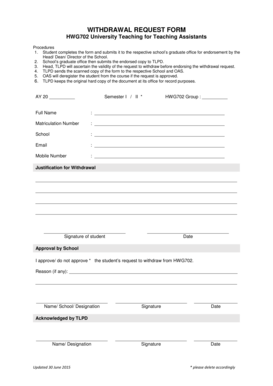
Get Withdrawal Request Bformb - Ntu Edu
How it works
-

Open form follow the instructions
-

Easily sign the form with your finger
-

Send filled & signed form or save
How to fill out the WITHDRAWAL REQUEST BFORMb - Ntu Edu online
Filling out the Withdrawal Request BFORMb is a crucial step for students seeking to officially withdraw from a course. This guide will provide you with clear, step-by-step instructions to ensure your form is completed accurately and efficiently.
Follow the steps to complete your withdrawal request form online.
- Click the ‘Get Form’ button to access the Withdrawal Request BFORMb and open it in your preferred editing tool.
- Fill in the academic year and semester information by entering 'AY 20 __________' and selecting 'Semester I / II *'.
- In the section labeled 'HWG702 Group', enter the appropriate group details relevant to your course.
- Clearly write your full name in the designated field, ensuring it matches official records.
- Input your matriculation number in the corresponding space for identification purposes.
- Specify your school by filling in the field with the name of your academic department.
- Provide your email address and mobile number for communication regarding your withdrawal request.
- Articulate your justification for withdrawal in the designated area, providing a clear and concise explanation.
- Sign and date the form in the space labeled 'Signature of student' and 'Date' to validate your request.
- Submit the completed form to your respective school’s graduate office for endorsement by the Head/ Dean/ Director of the School.
- Once endorsed, the graduate office will forward your request to the Teaching and Learning Performance Department (TLPD) for further processing.
- Await confirmation from TLPD regarding the endorsement of your withdrawal request and its approval status.
- If approved, TLPD will send a scanned copy of the signed withdrawal request form to your school and the Office of Academic Services (OAS).
- Upon receipt of approval from OAS, they will proceed to deregister you from the course.
- Finally, retain a copy of the completed form for your records and ensure all processes are followed.
Complete your withdrawal request form today and ensure your academic records are updated timely.
Industry-leading security and compliance
US Legal Forms protects your data by complying with industry-specific security standards.
-
In businnes since 199725+ years providing professional legal documents.
-
Accredited businessGuarantees that a business meets BBB accreditation standards in the US and Canada.
-
Secured by BraintreeValidated Level 1 PCI DSS compliant payment gateway that accepts most major credit and debit card brands from across the globe.