Loading
Get Notice To Enter Dwelling Unit - Vasona Management
How it works
-

Open form follow the instructions
-

Easily sign the form with your finger
-

Send filled & signed form or save
How to fill out the NOTICE TO ENTER DWELLING UNIT - Vasona Management online
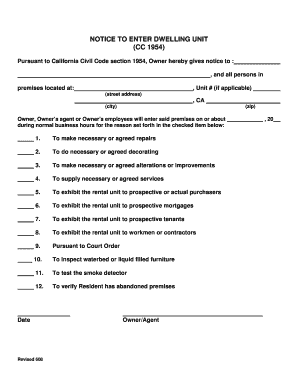
Filling out the NOTICE TO ENTER DWELLING UNIT - Vasona Management online can be a straightforward process when you understand each section of the form. This guide aims to provide you with clear and supportive instructions to help you complete the form accurately.
Follow the steps to successfully complete the form online.
- Click ‘Get Form’ button to obtain the form and open it in the designated editor.
- Fill in the notice recipient's name after 'Owner hereby gives notice to:'.
- Enter the full address of the premises, including the street address, unit number (if applicable), city, and zip code.
- Specify the date of entry by selecting a date when the owner or their agent intends to enter the dwelling.
- Choose the reason for entry by checking the appropriate box from the provided list. Ensure that you select the reason that accurately reflects the purpose of the entry.
- Complete the owner or owner's agent signature area, including the name of the person authorizing the entry and the date on which the notice is filled out.
- If applicable, indicate your authorization for the use of cleaning supplies by signing in the designated area.
- Review all entered information for accuracy and completeness.
- Once satisfied, save changes, and then you can download, print, or share the completed form.
Start filling out your documents online today!