We use cookies to improve security, personalize the user experience, enhance our marketing activities (including cooperating with our marketing partners) and for other business use.
Click "here" to read our Cookie Policy. By clicking "Accept" you agree to the use of cookies. Read less
Read more
Accept
Loading
Form preview
  • US Legal Forms
  • Form Library
  • More Forms
  • More Multi-State Forms
  • Bristol Register Of Disabled Children Registration Form - Bristol Gov

Get Bristol Register Of Disabled Children Registration Form - Bristol Gov

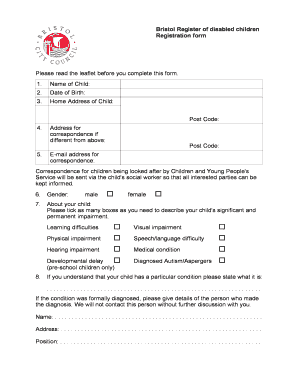
Bristol Register of disabled children Registration form Please read the leaflet before you complete this form. 1. Name of Child: 2. Date of Birth: 3. Home Address of Child: Post Code: 4. 5. Address.

How it works

  1. Open form

    Open form follow the instructions

  2. Easily sign form

    Easily sign the form with your finger

  3. Share form

    Send filled & signed form or save

How to fill out the Bristol Register Of Disabled Children Registration Form - Bristol Gov online

This guide provides clear, step-by-step instructions for completing the Bristol Register of Disabled Children Registration Form online. You will find all necessary information to ensure that your application is accurately filled out and submitted successfully.

Follow the steps to complete the registration form effectively.

  1. Click 'Get Form' button to obtain the form and open it in your editing tool.
  2. Enter the name of the child in the designated field.
  3. Fill in the child's date of birth in the appropriate section.
  4. Provide the home address of the child, including the post code.
  5. If correspondence should be sent to a different address, fill in that address and its post code.
  6. Enter an email address for correspondence purposes.
  7. Select the gender of the child by ticking the appropriate box.
  8. Describe the child's significant and permanent impairment by ticking as many options as applicable.
  9. If the child has a specific diagnosed condition, please state it in the provided field.
  10. If a diagnosis was formally made, provide details about the person who made that diagnosis.
  11. Indicate if you require correspondence in a format other than the standard format by providing the necessary details.
  12. Read and agree to the consent statement for registration, then provide the name and signature of the parent or guardian along with the date of signing.
  13. Tick the box that best describes the child's ethnicity.
  14. Once you have completed all sections, save your changes and choose to download, print, or share the completed form.

Complete the Bristol Register of Disabled Children Registration Form online today.

Get form

Experience a faster way to fill out and sign forms on the web. Access the most extensive library of templates available.
Get form

Related content

FAQs • Bristol, CT • CivicEngage
Assessor's Office - Renters, Homeowners Tax Relief Program & Disability Exemption ... I am...
Learn more
Bristol Community College
For a list of resources go to bristolcc.edu/newbedford. New Bedford students and employees...
Learn more
Registration Packet
Aug 21, 2020 — closely with the direction and guidance from the Bristol Board of ... to...
Learn more

Related links form

Form 3 Respondent Form.pdf - Chatham-Kent - Chatham-kent Edge Camp 2012 Registration Winter/Spring 2013 Session Course Registration Package Checklist Chapter B-7

Questions & Answers

Get answers to your most pressing questions about US Legal Forms API.

Contact support

call SAY on 0117 989 7725. email support@sendandyou.org.uk.

0117 922 2100, Monday to Friday, 8.30am to 6pm. 0117 922 2050, all other times.

You can: email development.management@bristol.gov.uk. write to Development Management, City Hall, Bristol City Council, PO Box 3399, Bristol, BS1 9NE.

For all other issues use the service numbers on this page or call the switchboard on 0117 922 2000.

For assistance with making a complaint or giving feedback in another language, braille, larger print or on audio tape, email complaints.feedback@bristol.gov.uk or use the above methods to get in touch. We can also arrange language interpreters and sign-language interpreters.

Once registered, you'll get a pink card from Disabled Children Services, which you can use as identification if your disability isn't obvious. It also allows you to get discounts.

You can: email development.management@bristol.gov.uk. write to Development Management, City Hall, Bristol City Council, PO Box 3399, Bristol, BS1 9NE. contact your local councillor and send us your comment through them.

For all other issues use the service numbers on this page or call the switchboard on 0117 922 2000.

Get This Form Now!

Use professional pre-built templates to fill in and sign documents online faster. Get access to thousands of forms.
Get form
If you believe that this page should be taken down, please follow our DMCA take down processhere.

Industry-leading security and compliance

US Legal Forms protects your data by complying with industry-specific security standards.
  • In businnes since 1997
    25+ years providing professional legal documents.
  • Accredited business
    Guarantees that a business meets BBB accreditation standards in the US and Canada.
  • Secured by Braintree
    Validated Level 1 PCI DSS compliant payment gateway that accepts most major credit and debit card brands from across the globe.
Get Bristol Register Of Disabled Children Registration Form - Bristol Gov
Get form
Form Packages
Adoption
Bankruptcy
Contractors
Divorce
Home Sales
Employment
Identity Theft
Incorporation
Landlord Tenant
Living Trust
Name Change
Personal Planning
Small Business
Wills & Estates
Packages A-Z
Form Categories
Affidavits
Bankruptcy
Bill of Sale
Corporate - LLC
Divorce
Employment
Identity Theft
Internet Technology
Landlord Tenant
Living Wills
Name Change
Power of Attorney
Real Estate
Small Estates
Wills
All Forms
Forms A-Z
Form Library
Customer Service
Terms of Service
Privacy Notice
Legal Hub
Content Takedown Policy
Bug Bounty Program
About Us
Help Portal
Legal Resources
Blog
Affiliates
Contact Us
Delete My Account
Site Map
Industries
Forms in Spanish
Localized Forms
State-specific Forms
Forms Kit
Legal Guides
Real Estate Handbook
All Guides
Prepared for You
Notarize
Incorporation services
Our Customers
For Consumers
For Small Business
For Attorneys
Our Sites
US Legal Forms
USLegal
FormsPass
pdfFiller
signNow
altaFlow
DocHub
Instapage
Social Media
Call us now toll free:
+1 833 426 79 33
As seen in:
  • USA Today logo picture
  • CBC News logo picture
  • LA Times logo picture
  • The Washington Post logo picture
  • AP logo picture
  • Forbes logo picture
© Copyright 1997-2025
airSlate Legal Forms, Inc.
3720 Flowood Dr, Flowood, Mississippi 39232
Form Packages
Adoption
Bankruptcy
Contractors
Divorce
Home Sales
Employment
Identity Theft
Incorporation
Landlord Tenant
Living Trust
Name Change
Personal Planning
Small Business
Wills & Estates
Packages A-Z
Form Categories
Affidavits
Bankruptcy
Bill of Sale
Corporate - LLC
Divorce
Employment
Identity Theft
Internet Technology
Landlord Tenant
Living Wills
Name Change
Power of Attorney
Real Estate
Small Estates
Wills
All Forms
Forms A-Z
Form Library
Customer Service
Terms of Service
Privacy Notice
Legal Hub
Content Takedown Policy
Bug Bounty Program
About Us
Help Portal
Legal Resources
Blog
Affiliates
Contact Us
Delete My Account
Site Map
Industries
Forms in Spanish
Localized Forms
State-specific Forms
Forms Kit
Legal Guides
Real Estate Handbook
All Guides
Prepared for You
Notarize
Incorporation services
Our Customers
For Consumers
For Small Business
For Attorneys
Our Sites
US Legal Forms
USLegal
FormsPass
pdfFiller
signNow
altaFlow
DocHub
Instapage
Social Media
Call us now toll free:
+1 833 426 79 33
As seen in:
  • USA Today logo picture
  • CBC News logo picture
  • LA Times logo picture
  • The Washington Post logo picture
  • AP logo picture
  • Forbes logo picture
© Copyright 1997-2025
airSlate Legal Forms, Inc.
3720 Flowood Dr, Flowood, Mississippi 39232