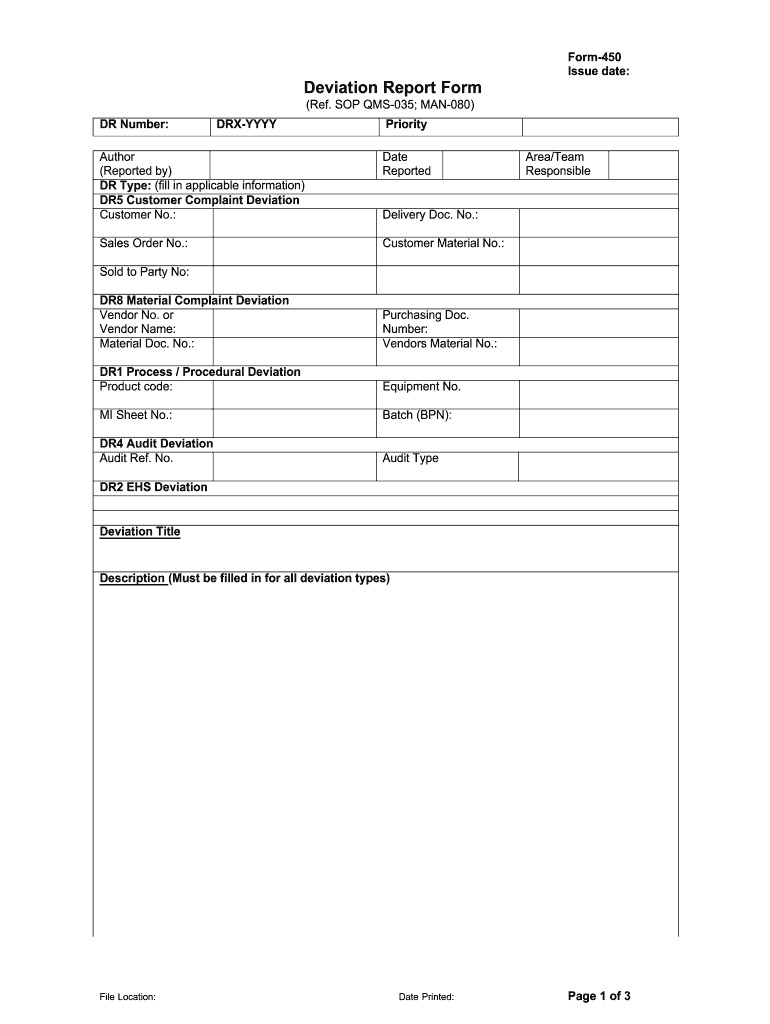
Form450 Issue date: Deviation Report Form (Ref. SOP QMS035; MAN080) DR Number: DRXYYYY Priority Author (Reported by) DR Type: (fill in applicable information) DR5 Customer Complaint Deviation Customer.

Open form follow the instructions

Easily sign the form with your finger

Send filled & signed form or save
How to fill out the Deviation Reporting Forms online
Filling out the Deviation Reporting Forms online is a crucial process for documenting and addressing deviations in operations. This guide provides a detailed, step-by-step approach to ensure you complete the form accurately and efficiently.
Follow the steps to complete your Deviation Reporting Form online.
- Press the ‘Get Form’ button to obtain the Deviation Reporting Form and open it in your preferred online editing tool.
- Identify and fill in the DR Number, which is required for tracking deviations. This number follows the format DRX-YYYY.
- Select the priority level for the deviation from the designated options provided in the form.
- Enter your name in the Author (Reported by) section. This identifies who is reporting the deviation.
- Choose the appropriate DR Type from the following options: Customer Complaint Deviation, Material Complaint Deviation, Process/Procedural Deviation, Audit Deviation, or EHS Deviation.
- Complete the required fields relevant to the selected DR Type. This may include Customer No., Sales Order No., Vendor Name, Product code, or Audit Ref. No. Be sure to provide detailed information.
- Move on to the Management Response Tasks section. Document the Area Manager's response by describing the corrective actions taken, and any preventative actions required.
- For the Second Management Response Tasks, review the Area Manager’s response, and provide justifications for the corrective actions taken.
- Complete the QA Management Response Tasks by entering the QA Manager’s evaluation of the deviation and the efficacy of the corrective actions taken.
- Fill out the Follow up Tasks section by detailing the tasks assigned, planned completion dates, and confirming completion with signatures and dates.
- Finally, once all sections are completed, save your changes and choose to download, print, or share the completed form as necessary.
Start filling out your Deviation Reporting Form online today for a seamless documentation process.
Experience a faster way to fill out and sign forms on the web. Access the most extensive library of templates available.
Related content
Technical guidance for compliance with regulations on air quality. The following are forms...
Use this form to report a single protocol deviation. Please note that a single protocol...
Like all current IQ tests, the Wechsler tests report a "deviation IQ" as the standard...
Get answers to your most pressing questions about US Legal Forms API.
When would you raise a deviation report?
When to raise a deviation: As soon a deviation occurs it should be immediately reported to Quality assurance (QA) within one working day from the time when the deviation has occurred or as per the Standard operating procedure (SOP).
What is a deviation report?
A deviation report is a real-time recording of a deviation. It will contain the investigations of the root-cause analysis and the implemented corrective and preventive actions. Deviation reports are mandated for compliance with cGMP.
What does reporting deviation mean?
Deviation Report means a report used to obtain approvals to temporarily modify or to document exceptions to usual operating, Manufacturing, packaging, testing instructions, test results or procedures.
How do you write a deviation report?
Description of the deviation: Include the who, where, what, when details in this section. Be specific, give exact and precise data. Do not attempt to give the “why” answer in this section. Detail only facts, data or observations prior to, during and/or after the event.
What does deviation mean in warehouse?
In the context of AWO (Advanced Warehouse Operations) a Deviation is a process that happens within the generation of a Task to swap the initial Routing assigned to the Task being generated with a different one, based on the Warehouse definition.
Who should raise deviation?
Anyone in the company can initiate a deviation report, but it is usually done by the responsible department. The deviation will be reported, up to 1 day after the discovery. It is necessary to be as clear and accurate as possible in the details provided when reporting a non-conformance to aid the investigation.
What is deviation form?
The Deviation Request Form is used to request for a process or product deviation. These. deviations are temporary and are used to document the deviated from requirement. condition. Deviations can apply to any defined requirement whether it be product or process.
Use professional pre-built templates to fill in and sign documents online faster. Get access to thousands of forms.
If you believe that this page should be taken down, please follow our DMCA take down process here.