Loading
Get Nationwide Building Society Isa Log In
How it works
-

Open form follow the instructions
-

Easily sign the form with your finger
-

Send filled & signed form or save
How to fill out the Nationwide Building Society Isa Log In online
This guide is designed to assist users in completing the Nationwide Building Society Isa Log In form online. With clear, step-by-step instructions, we aim to support a hassle-free experience in transferring existing ISA funds.
Follow the steps to complete the form efficiently.
- Click the ‘Get Form’ button to access the Nationwide Building Society Isa Log In form online. This will allow you to complete the relevant fields electronically.
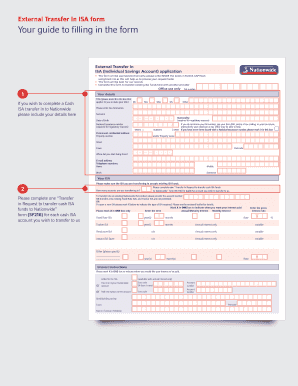
- Begin by entering your personal details in the provided fields. You will need to include your title, full forenames, surname, date of birth, and National Insurance number. Ensure that you write inside the boxes using block capitals to facilitate processing.
- Next, provide your permanent residential address, including property number or name, street, town, and postcode. Additionally, specify how long you have lived at this address.
- Indicate your email address and your contact numbers, including those for home, mobile, and work.
- Specify the details of the ISA you are transferring funds from. For each ISA account you wish to transfer, you must complete a separate transfer request form.
- Select the type of ISA to which you will be transferring funds. This includes options for fixed-rate ISAs, tracker ISAs, or flexclusive ISAs. Be sure to mark only one option.
- Indicate the amount you wish to transfer, choosing between whole balance, part transfers, or specific previous year subscriptions.
- Sign and date the declaration section to confirm that the information provided is accurate and that you agree to the terms and conditions.
- Lastly, review all provided information for accuracy. Once you are satisfied, you can save your changes, download, print, or share the completed form as necessary.
Complete your ISA transfer form online today for a seamless experience.
ISA stands for Individual Savings Account. The main difference between an ISA and any other savings account is that it offers tax-free interest payments. So you could get more for your money.
Industry-leading security and compliance
US Legal Forms protects your data by complying with industry-specific security standards.
-
In businnes since 199725+ years providing professional legal documents.
-
Accredited businessGuarantees that a business meets BBB accreditation standards in the US and Canada.
-
Secured by BraintreeValidated Level 1 PCI DSS compliant payment gateway that accepts most major credit and debit card brands from across the globe.