Loading
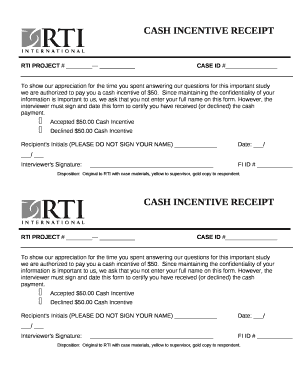
Get Cash Incentive Receipt Template
How it works
-

Open form follow the instructions
-

Easily sign the form with your finger
-

Send filled & signed form or save
How to fill out the CASH INCENTIVE RECEIPT Template online
This guide provides clear and user-friendly instructions for completing the CASH INCENTIVE RECEIPT Template online. Follow these detailed steps to ensure accurate and efficient submission.
Follow the steps to complete the CASH INCENTIVE RECEIPT Template effectively.
- Click the ‘Get Form’ button to acquire the CASH INCENTIVE RECEIPT Template and open it in your chosen web-based editor.
- Locate the RTI PROJECT # field at the top of the form. Enter the relevant project number associated with your participation in the study.
- Find the CASE ID # section. Input your unique case identification number. This ensures that the cash incentive is correctly linked to your information.
- Review the acknowledgment statement about the cash incentive. Carefully read the information provided regarding the $50 cash incentive for your participation.
- Indicate your choice by selecting either the 'Accepted' or 'Declined' option for the cash incentive. Mark the appropriate checkbox to reflect your decision.
- In the Recipient's Initials field, provide your initials. Remember, do not enter your full name for privacy reasons.
- Input the date in the designated field. Ensure the format is month/day/year.
- The interviewer must sign the form in the Interviewer's Signature section. This certification confirms that the cash incentive was either accepted or declined.
- Fill in the FI ID # section for the interviewer’s identification number, if applicable.
- Finally, review all entered information for accuracy. After ensuring everything is correct, you can choose to save changes, download the form, print it, or share it as needed.
Complete your CASH INCENTIVE RECEIPT Template online today to ensure your participation is recognized and rewarded.
What Is a Receipt PDF? A receipt PDF is an easy-to-fill form for businesses to create customer receipts. Use a receipt PDF template to create a record of the date, receipt number, recipient, item number, purchase description, price, tax rate, and total amount of the purchase.