Loading
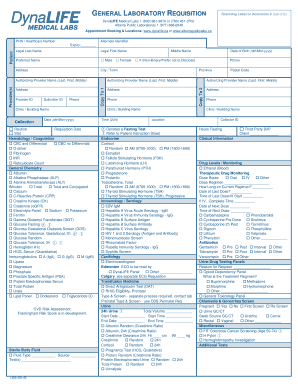
Get General Requisition Edmonton
How it works
-

Open form follow the instructions
-

Easily sign the form with your finger
-

Send filled & signed form or save
How to fill out the General Requisition Edmonton online
Filling out the General Requisition Edmonton form is an essential step in ensuring the accuracy and efficiency of laboratory testing. This guide provides a comprehensive overview for users to complete the form accurately and promptly.
Follow the steps to fill out the General Requisition Edmonton form online.
- Press the ‘Get Form’ button to access the form and open it for editing.
- Begin by entering the patient's Personal Health Number (PHN) or healthcare number in the designated field.
- Fill in the legal last name and legal first name of the patient, as well as the preferred name if applicable.
- Indicate the gender of the patient by selecting the appropriate option from the gender identity box.
- Enter the patient's complete address, including city or town, province, and postal code.
- Provide the submitter ID and provider ID as required. This may include the phone number for easier communication.
- Document the clinic or building name where the collection will occur, as well as the date and time of the appointment.
- Specify the authorizing provider's full name, contact information, and clinic/building name responsible for the test.
- Select the required tests from various categories, ensuring to follow any specific instructions or fasting requirements indicated.
- Include clinical information relevant to the tests requested and confirm whether a third-party bill is involved.
- Once all sections are completed, users can save changes, download, print, or share the completed form as needed.
Complete your General Requisition Edmonton form online today for a streamlined laboratory testing experience.
General Laboratory Requisition. Appointment Booking & Locations: .albertaprecisionlabs.ca or .dynalife.ca. Alberta Precision Laboratories 1-877-868-6848. ... 21302(Rev2022-11) □ ... ____________ □ Third Party Bill. ... Type & Screen - See TM Requisition. ... Reason For Request _____________