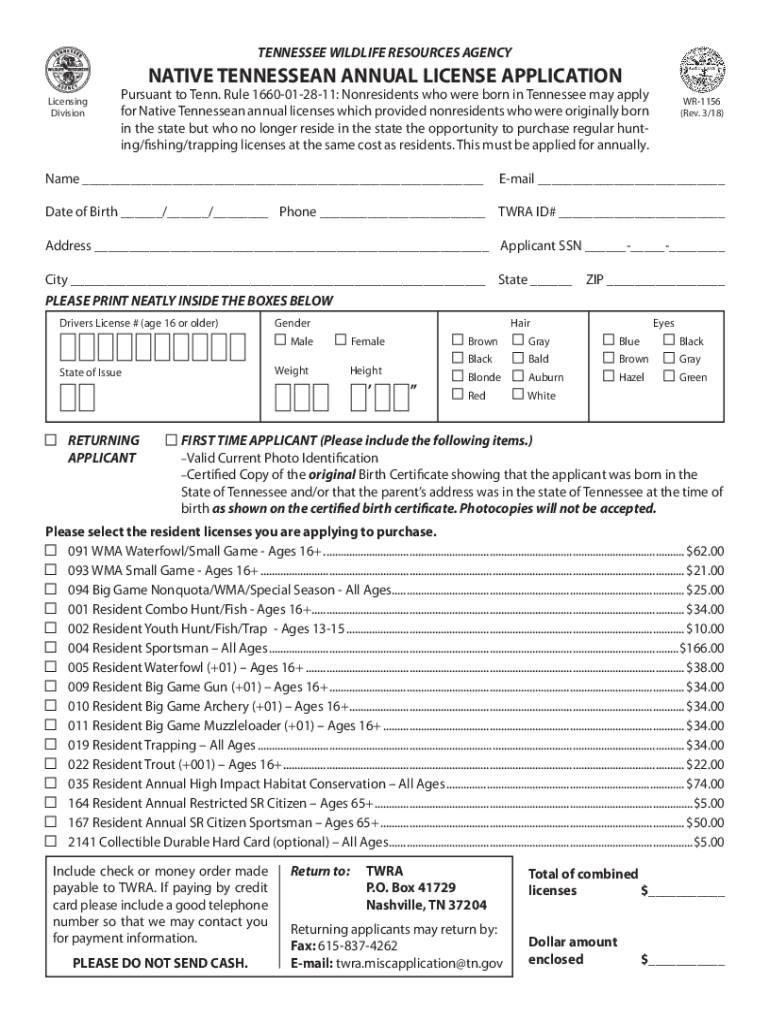
TENNESSEE WILDLIFE RESOURCES AGENCYNATIVE TENNESSEAN ANNUAL LICENSE APPLICATIONLicensing DivisionPursuant to Tenn. Rule 1660012811: Nonresidents who were born in Tennessee may apply for Native Tennessean.
Loading

Open form follow the instructions

Easily sign the form with your finger

Send filled & signed form or save
How to fill out the TN WR-1156 online
Navigating the process of applying for the Native Tennessean annual license can be simplified by understanding how to fill out the TN WR-1156 form online. This guide will provide you with clear, step-by-step instructions to ensure a smooth application process.
Follow the steps to complete the TN WR-1156 form online.
- Click ‘Get Form’ button to access the TN WR-1156 form and open it in your preferred editor.
- Begin filling out your personal information in the designated fields, including your full name, date of birth, email address, phone number, and TWRA ID number. Ensure that all information is accurate.
- Provide your residential address details, including city, state, and ZIP code, ensuring all information is clearly presented.
- Indicate your gender and provide your driver's license number if you are age 16 or older. You should also fill out your physical attributes such as weight, height, and eye color.
- Select whether you are a returning applicant or a first-time applicant. If you are a first-time applicant, make sure to include a valid photo ID and a certified copy of your birth certificate.
- Choose the specific resident licenses you wish to apply for from the provided options, ensuring you understand the fees associated with each license.
- Include a check or money order made payable to TWRA to cover the total amount of combined licenses. If you choose to pay by credit card, ensure to provide a contact number for payment verification.
- After completing the form, review all entered information for accuracy. You can then save your changes, download, print, or share the form as needed.
Complete your TN WR-1156 form online today!
Experience a faster way to fill out and sign forms on the web. Access the most extensive library of templates available.
Related content
Rule 1660-01-28-11: Nonresidents who were born in Tennessee may apply for Native...
Tennessee Application of Pesticide Act (TAPA, Pest Control Operators) / Pest Control...
The Muscogee, also known as the Muskogee, Muscogee Creek, Creek, Mvskokvlke, or the...
Use professional pre-built templates to fill in and sign documents online faster. Get access to thousands of forms.
If you believe that this page should be taken down, please follow our DMCA take down process here.