Loading
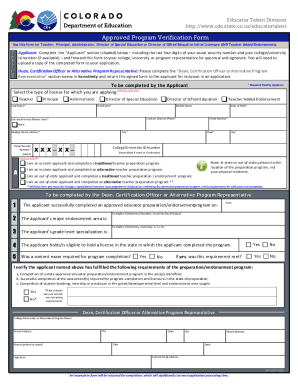
Get Co Cde Approved Program Verification Form 2021-2026
How it works
-

Open form follow the instructions
-

Easily sign the form with your finger
-

Send filled & signed form or save
How to fill out the CO CDE Approved Program Verification Form online
The CO CDE Approved Program Verification Form is essential for individuals seeking initial licensure or added endorsements in educational roles. This guide will provide step-by-step instructions on how to accurately complete the form online.
Follow the steps to complete the CO CDE Approved Program Verification Form.
- Click ‘Get Form’ button to obtain the form and open it for editing.
- In the Applicant section (shaded), fill in your last name, first name, and middle name. Provide your contact daytime phone number, any previous names used, date of birth, and email address.
- Enter your mailing street address, including city, state, and zip code. Include the last four digits of your social security number and your college/university ID number, if available.
- Select the type of license for which you are applying by checking only one option from the available choices, such as Teacher, Principal, Administrator, Director of Special Education, or Director of Gifted Education.
- Indicate whether you are an in-state or out-of-state applicant and the type of teacher preparation program completed by selecting the appropriate option.
- If applicable, ensure to include a signed letter from your state department of education for alternative programs, confirming the program's requirements.
- The Dean, Certification Officer, or Alternative Program Representative will complete their section by entering the date of program completion, endorsement area, and grade-level specialization.
- Confirm if a content exam was required for program completion and whether this requirement has been met.
- The verifying party must confirm that the applicant has fulfilled all required components of the educator preparation program. If any requirements were not met, they should indicate the reasons.
- Finally, the Dean, Officer, or Representative must provide their printed name, signature, contact details, and the date before returning the completed form to the applicant.
- Once all information is filled out, save your changes, download or print the form, and ensure it is properly submitted as part of your application.
Complete your CO CDE Approved Program Verification Form online today!