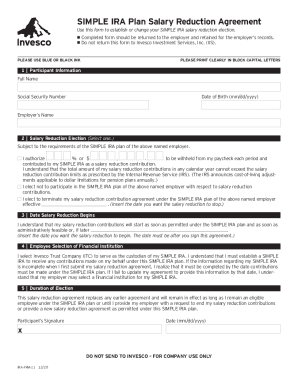
PrintPlease remember to sign form after printing.Clear FormSIMPLE IRA Plan Salary Reduction Agreement Use this form to establish or change your SIMPLE IRA salary reduction election. Completed form.
Open form follow the instructions
Easily sign the form with your finger
Send filled & signed form or save
How to fill out the Invesco IRA-FRM-11 online
The Invesco IRA-FRM-11 is an important document used to establish or modify your SIMPLE IRA salary reduction agreement. This guide provides comprehensive instructions to assist you in accurately completing the form online.
Follow the steps to complete your SIMPLE IRA salary reduction agreement.
- Click 'Get Form' button to obtain the form and open it in the editor.
- In the 'Participant Information' section, carefully fill in your full name, Social Security number, date of birth (format: mm/dd/yyyy), and your employer’s name using blue or black ink. Ensure you print clearly in block capital letters.
- Next, proceed to the 'Salary Reduction Election' section. Select one of the options provided: state the percentage or amount to be withheld from your paycheck, choose not to participate, or elect to terminate your current salary reduction contributions. If terminating, insert the effective date.
- In the 'Date Salary Reduction Begins' section, specify the start date for your salary reduction contributions. This date must be after you sign the form.
- Choose your financial institution by selecting Invesco Trust Company as the custodian of your SIMPLE IRA. Ensure that all required information is completed appropriately, as your contributions will depend on this selection.
- Finally, review the 'Duration of Election' section. This agreement remains in effect as long as you are an eligible employee or until you provide a request to alter your salary reduction contributions or create a new agreement.
- Don't forget to sign and date the form in the appropriate fields provided at the end.
- After completing the form, save your changes. You can then download, print, or share the form as needed. Remember to submit the completed form to your employer, not to Invesco.
Take the first step toward managing your retirement savings by filling out the Invesco IRA-FRM-11 online today.
Experience a faster way to fill out and sign forms on the web. Access the most extensive library of templates available.
Related content
Jun 26, 2021 — Keep the original form. Don't file it with the IRS. If you set up a...
Mar 18, 2015 — structure and an initiative for small company stocks that recog-. VerDate...
Fidelity Investments Inc., commonly referred to as Fidelity, earlier as Fidelity...
Get answers to your most pressing questions about US Legal Forms API.
How do I withdraw money from my debt fund?
If there is a need to withdraw money, a debt mutual fund can be broken into units of `1 and investors can withdraw only the amount required. As compared to this, in a small-savings product or a fixed deposit, you would need to break the entire deposit. What are the key risks in a debt fund?
How do I get my money out of Invesco?
Withdrawals can be made online or by downloading and mailing in the distribution request form. Account owners can also request a qualified distribution by telephone at (877) 615-4116.
Does Invesco have IRA accounts?
Depending on your tax bracket, you may be eligible to contribute to a traditional IRA, a Roth IRA, or both.
How do I contact Invesco Simple IRA?
For additional assistance please contact an Invesco Client Services representative at 800 959 4246, weekdays, 7 a.m. to 6 p.m. Central Time.
What is the penalty for early withdrawal from Invesco?
Early Distribution: If you are taking an early distribution, the taxable amount of the distribution may be subject to federal income tax as ordinary income and may be subject to an additional 10% penalty tax.
How long does it take to withdraw money in Invesco?
Once trade settlement is complete, funds will typically arrive in your Cash Account or external bank account in 1-2 business days. It may take longer if, for example, you recently made a deposit or if you are withdrawing to a different bank account than the one used for initial funding.
How do I withdraw money from Invesco?
Withdrawals can be made online or by downloading and mailing in the distribution request form. Account owners can also request a qualified distribution by telephone at (877) 615-4116.
How do I access my Invesco account?
To register, go to https://account-service.invesco.com/ and click the “Register Now” button. Once you do, you will be asked to provide your first name, last name, and email address and create a password. You will then receive an email asking you to confirm your email address.
Use professional pre-built templates to fill in and sign documents online faster. Get access to thousands of forms.
If you believe that this page should be taken down, please follow our DMCA take down process here.