Loading
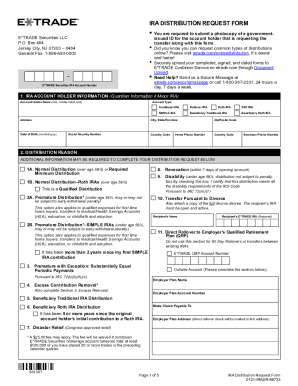
Get General Fax: 1-866-650-0003
How it works
-

Open form follow the instructions
-

Easily sign the form with your finger
-

Send filled & signed form or save
How to fill out the General Fax: 1-866-650-0003 online
Filling out the General Fax form for your IRA distribution request is a straightforward process. This guide provides detailed, step-by-step instructions to help you complete the form accurately and efficiently.
Follow the steps to fill out the form correctly.
- Press the ‘Get Form’ button to acquire the necessary document and open it in your preferred editor.
- Enter your E*TRADE Securities IRA Account Number in the designated field, ensuring it is correct to avoid processing issues.
- Complete the IRA account holder information. This includes your full name, account type, address, date of birth, social security number, and contact numbers.
- Select the reason for your distribution. Review each option carefully and check the appropriate box, as some may require additional information.
- If applicable, complete the Excess Removal section. Provide the year pertaining to your excess contribution and specify your handling preference.
- Specify your method of distribution. Choose between options like one-time payment, balance of account, or periodic payments, and provide the required details.
- Fill out payment instructions. Indicate how you want to receive your funds, choosing from options such as a check, wire transfer, or deposit into an existing account.
- Complete the withholding election section, if applicable. Indicate your preferences for federal and state withholding on your distribution.
- Sign the form. Ensure the signature matches the account holder's name and include the date of signing.
- Once all fields are completed, review the form for accuracy. Save your changes, and prepare to upload or submit the form as directed in your instructions.
Start completing your document online today!
Wire money to your E*TRADE Securities account: Complete and print out our E*TRADE Securities Wire Transfer Form. Send the completed form to your other financial institution and ask them to wire funds to E*TRADE Securities.