Loading
Get Taco Bell Letterhead
How it works
-

Open form follow the instructions
-

Easily sign the form with your finger
-

Send filled & signed form or save
How to fill out the Taco Bell Letterhead online
Filling out the Taco Bell Letterhead is a straightforward process that requires attention to detail. This guide will provide you with clear and concise steps to successfully complete the form online, ensuring that all necessary information is included.
Follow the steps to fill out the Taco Bell Letterhead correctly.
- Click ‘Get Form’ button to obtain the Taco Bell Letterhead and open it in your preferred online document editor.
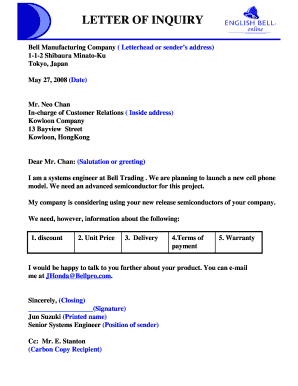
- Begin by entering the sender's address at the top of the letterhead. Include the name of the organization, street address, city, state, zip code, and contact number, ensuring all details are accurate and up to date.
- Next, input the date two lines below the sender’s address. Format the date as month, day, and year for clarity.
- Enter the recipient's address starting two lines beneath the date. This should include the recipient's name, title, company name, street address, city, and country.
- Proceed to the salutation. Address the recipient appropriately based on your relationship, using 'Dear [Recipient’s Name]:' for formal correspondence.
- Draft the body of the letter. Start with an introduction that briefly states who you are and your position. Follow up with the main content explaining the purpose of the inquiry and specific details like discounts, unit prices, and delivery terms.
- Conclude the letter by summarizing your request clearly and mentioning your desire for a prompt response. Thank the recipient for their time in the closing remarks.
- For the closing, write ‘Sincerely,’ or another appropriate sign-off two lines below the body of the letter, leaving space for your signature directly below it.
- Finally, enter your printed name and position below the signature space. Review the document for accuracy, then save your changes, download, print, or share the completed letter as necessary.
Take the next step in your communication by filling out the Taco Bell Letterhead online today.
In 1992, it featured a tone version of the bell with the color scheme wholly changed. The bell tilted on top of a vertical-blocky wordmark. Orange and purple were the colors adopted for this design. Taco Bell launched yet another logo design in 1995.
Industry-leading security and compliance
US Legal Forms protects your data by complying with industry-specific security standards.
-
In businnes since 199725+ years providing professional legal documents.
-
Accredited businessGuarantees that a business meets BBB accreditation standards in the US and Canada.
-
Secured by BraintreeValidated Level 1 PCI DSS compliant payment gateway that accepts most major credit and debit card brands from across the globe.