Get Prior Written Notice Template
How it works
-

Open form follow the instructions
-

Easily sign the form with your finger
-

Send filled & signed form or save
How to fill out the Prior Written Notice Template online
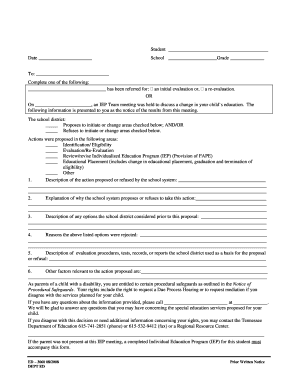
The Prior Written Notice Template is an essential document designed to inform parents and guardians about changes or evaluations related to their child's special education services. This guide provides step-by-step instructions on how to complete the form online, ensuring clear communication and understanding of the process.
Follow the steps to effectively complete the Prior Written Notice Template online.
- Press the ‘Get Form’ button to access the Prior Written Notice Template, which will open in your online editor.
- In the first section, enter the name of the student in the designated field. Ensure that the student's full name is clearly entered to avoid any confusion.
- Next, fill in the date in the appropriate field. This should reflect the date you are completing the form.
- Continue by entering the name of the school and the student's grade level in the specified fields.
- Identify the recipient of the notice by writing their name in the provided field.
- Select one of the options for referral by checking the box next to 'initial evaluation' or 're-evaluation' based on what is applicable.
- Specify the date the IEP Team meeting occurred in the designated field to inform the recipient of when the discussion took place.
- Indicate whether the school district proposes to initiate or change areas by checking the appropriate box(es) that apply.
- In the sections marked for actions proposed or refused, check the relevant areas such as 'Identification/Eligibility', 'Evaluation/Re-Evaluation', and others as necessary.
- Provide a detailed description of the action proposed or refused by the school system in the corresponding space.
- Explain the rationale behind the school district's proposal or refusal in the next field provided.
- Describe any options considered by the school district before making this proposal in the specific area designated.
- List the reasons that led to rejecting the options previously considered.
- Outline the evaluation procedures, tests, and reports that were the basis for the proposal or refusal.
- Detail any additional relevant factors related to the proposed action.
- Conclude by reviewing the completed form for accuracy and clarity before taking any further action.
- Lastly, save your changes, and options to download, print, or share the completed template are available.
Complete your documents online today for efficient management of your child's special education needs.
California Education Code § 56500.4 requires that school districts must provide prior written notice (PWN) to "parents or guardians of an individual with exceptional needs, or to the parents or guardians of a child upon initial referral for assessment, and a reasonable time before the public agency proposes to initiate ...