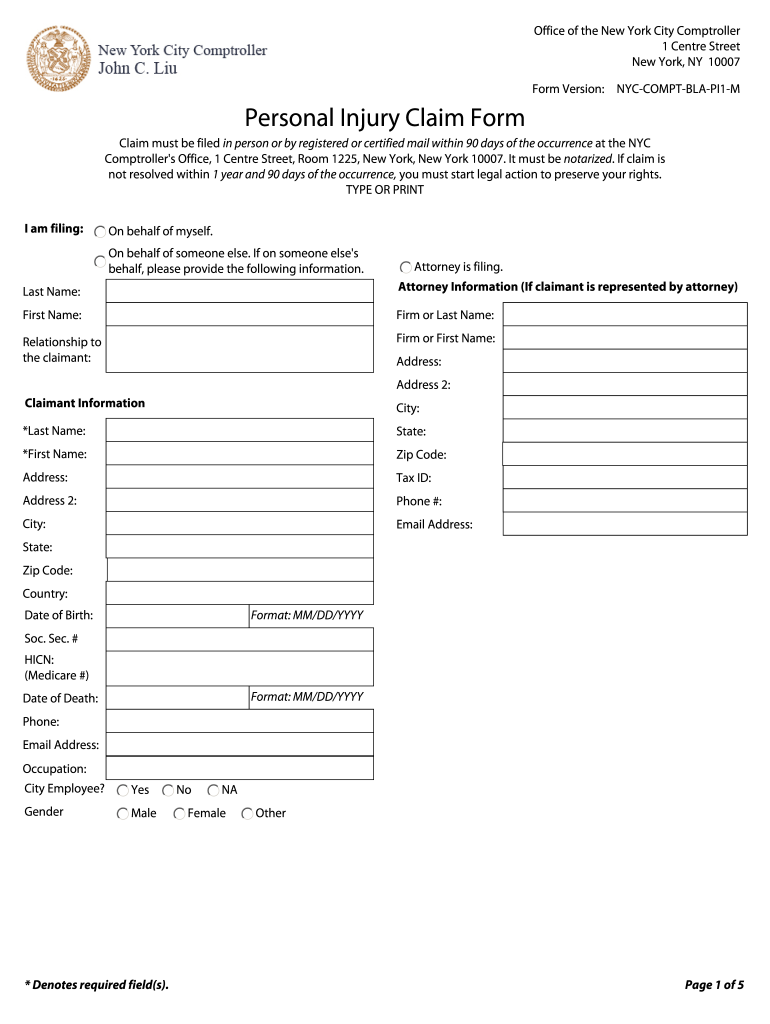
D mail within 90 days of the occurrence at the NYC Comptroller's Office, 1 Centre Street, Room 1225, New York, New York 10007. It must be notarized. If claim is not resolved within 1 year and 90 days of the occurrence, you must start legal action to preserve your rights. TYPE OR PRINT I am filing: On behalf of myself. On behalf of someone else. If on someone else's behalf, please provide the following information. Attorney is filing. Last Name: Attorney Information (If claimant is represente.
Loading

Open form follow the instructions

Easily sign the form with your finger

Send filled & signed form or save
How to fill out the Comptroller NYC Claim online
Filing a claim with the New York City Comptroller's Office can be an essential step in seeking compensation for personal injuries. This guide provides a clear, step-by-step approach to help you complete the Comptroller NYC Claim form online accurately and efficiently.
Follow the steps to complete your claim form.
- Press the ‘Get Form’ button to access the claim form and open it in your preferred document editor.
- In the section titled 'Claimant Information,' provide the claimant's last name, first name, address, tax ID, phone number, email address, date of birth, social security number, and any other requested details marked with an asterisk (*).
- For the 'Time and Place Where the Claim Arose' section, fill in the date and time of the incident, location, and describe how the claim arose. Use an additional sheet if necessary.
- Under 'Medical Information,' enter the date of the first treatment, the name and address of the hospital, and answer whether the claimant was taken to the hospital by ambulance.
- If applicable, in the 'Employment Information' section, provide your employer's name and address, number of work days lost, and weekly earnings.
- Complete the witness information sections by listing the names and addresses of up to six witnesses related to the incident.
- If your claim involves a NYC vehicle, fill out the vehicle owner's details and insurance information. Also, provide details about the nature of the claimant (driver, passenger, etc.) and the total amount claimed.
- Finally, sign the form in the claim statement area, ensuring that it is notarized as required. Review for completeness before proceeding.
- After filling out all sections, save your changes, download the form, print it as needed, and share it for submission to the NYC Comptroller’s Office.
Complete your Comptroller NYC Claim online and take the important step toward seeking compensation.
Experience a faster way to fill out and sign forms on the web. Access the most extensive library of templates available.
Related content
File a Claim ... The New York City Comptroller's Office is responsible for overseeing the...
by S Isaacs · 2003 — Comptroller's Office to “inves- tigate and, if appropriate, to...
The Office of Comptroller of New York City, a position established in 1801, ... handles...
Get answers to your most pressing questions about US Legal Forms API.
How do I check the status of my NYS Comptroller claim?
What is the status of my claim? If you have your confirmation number or claim reference number: check your claim status online, or. call 800-221-9311.
How long do you have to file a lawsuit in NYC?
In civil cases, statutes of limitations usually range between one and ten years. Sometimes this time period is counted from the date of the event itself – as in the date of a personal injury.
How do I file a notice of claim against New York State?
Service of a Notice of Claim on the New York Secretary of State as agent of a public corporation may be accomplished by serving an authorized person at the New York Department of State's office at One Commerce Plaza, 99 Washington Avenue, Albany, NY 12231.
What is the statute of limitations for claims against the city of New York?
In the State of New York a person has 90 days to file a notice of claim and 1 year and 90 days to commence a lawsuit against a city, village or town government or their agencies.
How do I file a claim with NYC?
Call our Telephone Claim Center, toll-free during business hours to file a claim. 1-888-209-8124. Telephone filing hours are as follows: Monday through Friday, 8:00 am to 5:00 pm.
How do I find out if I have unclaimed money in NYC?
Unclaimed Funds Agency: New York State Comptroller. Division: Department of Audit and Control Abandoned Property Unit Local Office. Phone Number: (800) 221-9311. Business Hours: Monday - Friday: 9 AM - 5 PM.
What is required on a notice of claim in New York City?
FORM AND CONTENT OF THE NOTICE OF CLAIM Pedigree information –i.e. name and address of claimant and attorney. Sworn by or on behalf of the claimant. Description of the nature of the claim (what did the public corporation do wrong (tort/negligence)). Place where the injury occurred, date and time.
How long do you have to file a notice of claim against NYC?
Pursuant to the New York State General Municipal Law § 50-e, a notice of claim must be properly served within 90 days from the date of occurrence.
Use professional pre-built templates to fill in and sign documents online faster. Get access to thousands of forms.
If you believe that this page should be taken down, please follow our DMCA take down process here.