Loading
Form preview
  • US Legal Forms
  • Other Templates
  • More Forms
  • More Multi-State Forms
  • G1v Online Medical Questionnaire - Gov.uk

Get G1v Online Medical Questionnaire - Gov.uk

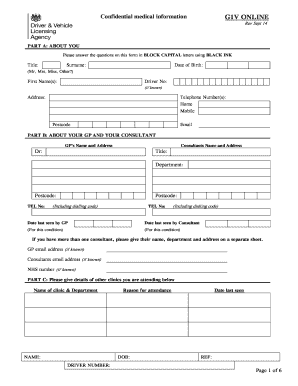
G1V ONLINEConfidential medical informationRev Sept 14PART A: ABOUT YOU Please answer the questions on this form in BLOCK CAPITAL letters using BLACK INKTitle:Surname:Date of Birth:(Mr, Mrs, Miss,.

How it works

  1. Open form

    Open form follow the instructions

  2. Easily sign form

    Easily sign the form with your finger

  3. Share form

    Send filled & signed form or save

How to fill out the G1v Online Medical Questionnaire - Gov.uk online

Filling out the G1v Online Medical Questionnaire is an essential step for assessing your medical fitness to drive. This guide provides clear and supportive instructions on completing each section of the form effectively.

Follow the steps to complete the G1v online medical questionnaire

  1. Press the ‘Get Form’ button to obtain the questionnaire and open it in your preferred document editor.
  2. In Part A, provide your personal details such as title, surname, date of birth, first name(s), driver number (if known), address, telephone numbers, postcode, and email address. Ensure to use block capital letters and black ink for legibility.
  3. In Part B, fill in details about your General Practitioner (GP) and any consultants. Include their names, addresses, and telephone numbers, along with the dates you were last seen by them. If there is more than one consultant, attach an additional sheet with their information.
  4. For Part C, list any other clinics you are attending, providing the name of the clinic, department, reason for attendance, and related details. Include your date of birth and driver number.
  5. Proceed to the questionnaire section where you will answer questions about your medical conditions, including their diagnosis dates and any relevant details regarding their cause. Be thorough in your responses.
  6. Provide information about how your condition affects your driving and general day-to-day activities in the designated fields.
  7. List your current medications, including the names, dosages, and reasons for taking them. Specify whether these medications make you drowsy or confused when driving.
  8. Answer questions related to your driving assessments and any special vehicle controls you may require.
  9. Complete the declaration section by confirming that all information provided is correct and authorize your doctor to release relevant medical information.
  10. Review the entire form for accuracy and completeness. Once satisfied, you can save the changes, download, print, or share the filled-out questionnaire as required.

Complete the G1v online medical questionnaire today to ensure your driving fitness is properly assessed.

Get form

Experience a faster way to fill out and sign forms on the web. Access the most extensive library of templates available.
Get form

Related content

Validation of the Adult Eating Behaviour...
by R Jacob — The data are cross-sectional, but all measurement were undertaken in ... of...
Learn more
Validity and reliability of a brief self-reported...
by LA Vézina-Im · 2016 · Cited by 11 — To assess the validity of the fruit and...
Learn more
FN MAG - Wikipedia, the free encyclopedia
The FN MAG is a Belgian 7.62 mm general-purpose machine gun, designed in the early 1950s...
Learn more

Related links form

Protocol Amendment Form (PDF) - University Of Rhode Island - Uri Plan Of Graduate Study For The Doctoral Degree - Universidad De ... Guidelines For Release Of PHI - University Of Pittsburgh RSA Funding Proposal - University Of Puget Sound

Questions & Answers

Get answers to your most pressing questions about US Legal Forms API.

Contact support

When you have told the Driver and Vehicle Agency (DVA) of a medical condition or disability, the medical advisers will decide if you satisfy the medical standards of fitness to drive. A licence will then be issued, refused, or revoked.

V1 Document Management System V1 adds advanced document referencing, optionally barcoding of documents and version control. V1 offers companies a long-term document management solution with auto hiving / destruction functionality and document storage security.

Get This Form Now!

Use professional pre-built templates to fill in and sign documents online faster. Get access to thousands of forms.
Get form
If you believe that this page should be taken down, please follow our DMCA take down processhere.
Get G1v Online Medical Questionnaire - Gov.uk
Get form
  • Adoption
  • Bankruptcy
  • Contractors
  • Divorce
  • Home Sales
  • Employment
  • Identity Theft
  • Incorporation
  • Landlord Tenant
  • Living Trust
  • Name Change
  • Personal Planning
  • Small Business
  • Wills & Estates
  • Packages A-Z
  • Affidavits
  • Bankruptcy
  • Bill of Sale
  • Corporate - LLC
  • Divorce
  • Employment
  • Identity Theft
  • Internet Technology
  • Landlord Tenant
  • Living Wills
  • Name Change
  • Power of Attorney
  • Real Estate
  • Small Estates
  • Wills
  • All Forms
  • Forms A-Z
  • Other Templates
  • Legal Hub
  • About Us
  • Help Portal
  • Legal Resources
  • Blog
  • Affiliates
  • Contact Us
  • Delete My Account
  • Site Map
  • Industries
  • Forms in Spanish
  • Localized Forms
  • State-specific Forms
  • Forms Kit
  • Real Estate Handbook
  • All Guides
  • Notarize
  • Incorporation services
  • For Consumers
  • For Small Business
  • For Attorneys
  • USLegal
  • FormsPass
  • pdfFiller
  • signNow
  • altaFlow
  • DocHub
  • Instapage
Form Packages
  • Adoption
  • Bankruptcy
  • Contractors
  • Divorce
  • Home Sales
  • Employment
  • Identity Theft
  • Incorporation
  • Landlord Tenant
  • Living Trust
  • Name Change
  • Personal Planning
  • Small Business
  • Wills & Estates
  • Packages A-Z
Form Categories
  • Affidavits
  • Bankruptcy
  • Bill of Sale
  • Corporate - LLC
  • Divorce
  • Employment
  • Identity Theft
  • Internet Technology
  • Landlord Tenant
  • Living Wills
  • Name Change
  • Power of Attorney
  • Real Estate
  • Small Estates
  • Wills
  • All Forms
  • Forms A-Z
  • Other Templates
Customer Service
  • Legal Hub
  • About Us
  • Help Portal
  • Legal Resources
  • Blog
  • Affiliates
  • Contact Us
  • Delete My Account
  • Site Map
  • Industries
  • Forms in Spanish
  • Localized Forms
  • State-specific Forms
  • Forms Kit
Legal Guides
  • Real Estate Handbook
  • All Guides
Prepared for you
  • Notarize
  • Incorporation services
Our Customers
  • For Consumers
  • For Small Business
  • For Attorneys
Our Sites
  • USLegal
  • FormsPass
  • pdfFiller
  • signNow
  • altaFlow
  • DocHub
  • Instapage
Social Media
Call us now toll free:
+1 833 426 79 33
As seen in:
© Copyright 1999-2026 airSlate Legal Forms, Inc. 17 Station Street, Ste. 203, Brookline, MA 02445
  • Your Privacy Choices
  • Terms of Service
  • Privacy Notice
  • Content Takedown Policy
  • Bug Bounty Program