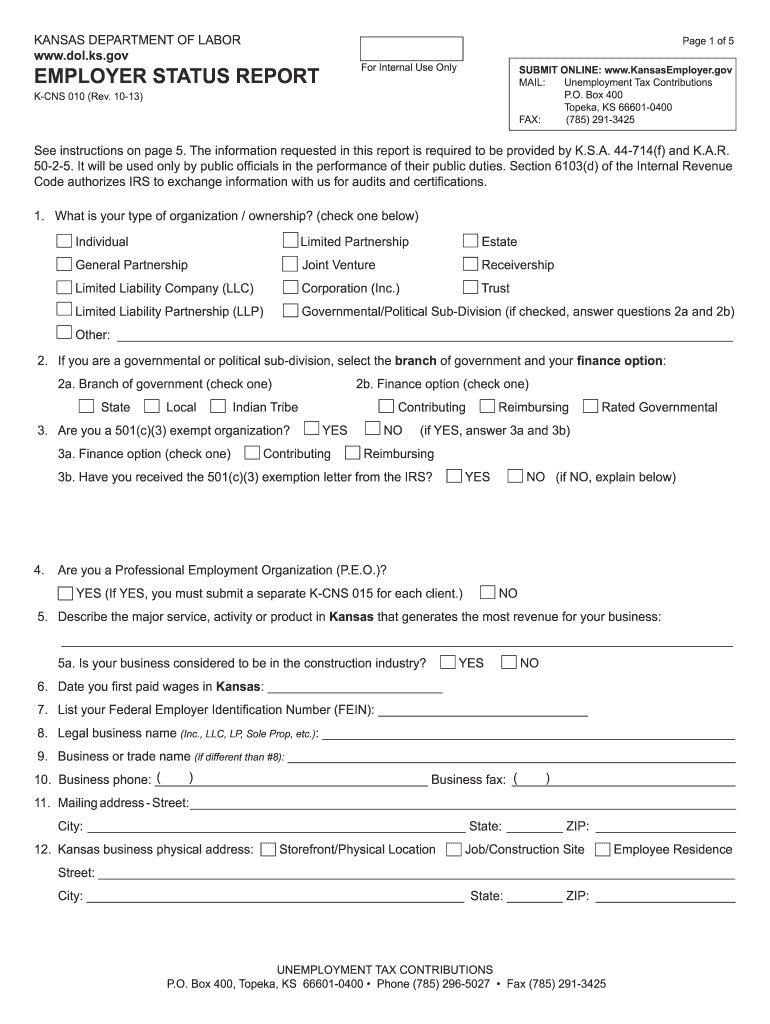
KansasEmployer. gov MAIL Unemployment Tax Contributions P. O. Box 400 Topeka KS 66601-0400 FAX 785 291-3425 K-CNS 010 Rev. 10-13 See instructions on page 5. If YES you must complete a K-CNS 015 for each client that you represent. 5. Describe your major service or product in Kansas that portion producing the major income source. I certify that the information I have provided on this report is complete correct and true to the best of my knowledge a.
Loading

Open form follow the instructions

Easily sign the form with your finger

Send filled & signed form or save
How to fill out the K Cns 010 online
This guide provides step-by-step instructions for completing the K Cns 010, also known as the Employer Status Report. The aim is to simplify the process for users with varying levels of experience in digital document management.
Follow the steps to accurately complete the K Cns 010 online
- Press the ‘Get Form’ button to access the K Cns 010 form and open it for editing.
- Begin with section 1 by selecting the appropriate type of organization or ownership by placing an 'X' next to the relevant option.
- If a governmental or political sub-division is selected, indicate the branch of government and the finance option in sections 2a and 2b.
- For section 3, specify if you are a 501(c)(3) exempt organization and answer questions 3a and 3b accordingly.
- In section 4, indicate whether you are a Professional Employment Organization (P.E.O.). If ‘YES’, remember to submit a K-CNS 015 for each client.
- Provide a description of your major service, activity, or product that generates the most revenue in Kansas in section 5.
- Record the date you first paid wages in Kansas in section 6.
- Enter your Federal Employer Identification Number (FEIN) in section 7.
- Fill in your legal business name in section 8 and trade name in section 9 if applicable.
- Complete sections 10 and 11 by providing your business phone, business fax, and the mailing address.
- In section 12, specify your business's physical address in Kansas, accurately detailing the street, city, state, and ZIP code.
- Indicate where your accounting records are maintained in section 13, either providing the address or checking the box if it is the same as the previous address.
- Identify your payroll contact in section 14 by providing their name, phone number, email, and address.
- In section 15, enter the full legal names and addresses of owners, corporate officers, and any relevant identifiers, avoiding nicknames.
- Record all Kansas wages paid by calendar quarter in section 16 for the current and prior year.
- In section 17, indicate which week established your liability based on employment numbers.
- Respond to section 18 with details about acquiring a business, if applicable.
- List any multiple business locations you operated in Kansas for the last three years in section 19.
- Indicate your status regarding the Federal Unemployment Tax Act (FUTA) in section 20.
- Decide if you wish to elect for coverage in section 21 and mark your choice.
- Confirm if your business is continuing to pay wages in section 22.
- If applicable, detail any individuals performing services you believe are not employees in section 23.
- Indicate if you wish to have a KDOL representative contact you for further information in section 24.
- Finally, certify the accuracy of the information provided in section 25 by signing, entering your title, and noting the date.
- Once completed, save your changes, and prepare to download, print, or share the form as needed.
Start filling out the K Cns 010 online today, ensuring all required details are accurately provided.
Experience a faster way to fill out and sign forms on the web. Access the most extensive library of templates available.
Related content
K-CNS 010 (Rev. 3-19). Page 1 of 5. SUBMIT ONLINE: www.KansasEmployer.gov. MAIL:...
Status report #K-CNS-010 may be found online at www.dol.ks.gov. Section III – During...
As the resident macrophage cells, they act as the first and main form of active immune...
Get answers to your most pressing questions about US Legal Forms API.
What is the wage base in Kansas?
The Kansas minimum wage is $7.25 per hour. All employees not covered by the Federal Fair Labor Standard Act must be paid Kansas minimum wage.
What is the supplemental tax rate for Kansas 2023?
Regents should be aware that the withholding on supplemental wages rate remains at 22% for 2023.
What is Kansas unemployment wage base for 2023?
The unemployment taxable wage base will increase from $34,800 to $36,100 in 2023. The Kansas 2023 SUI tax rates were issued on November 10, 2022.
Who has to pay Kansas unemployment tax?
An employer with 50 or more employees or third-party administrators with more than 50 client employees are required to electronically file all Quarterly Wage Report and Unemployment Tax Returns and make any payments online.
What is Kansas wage withholding?
Kansas withholding tax is the money that is required to be withheld from wages and other taxable payments to help prepay the Kansas income tax of the recipient. An employer or payer pays no part of this tax,but is responsible for deducting it from wages or taxable payments made to an employee or payee.
What is Kansas payroll tax rate?
If you're single, married and filing separately or a head of a household, you will be taxed at 3.10% on the first $15,000 of taxable income, at 5.25% on the next $15,000 and at 5.70% on all income above $30,000. For married couples filing jointly, the tax rates are the same, but the income brackets are doubled.
What is the federal wage base?
The taxable wage base is the amount of an employee's income from which the IRS calculates an individual's tax liability for Social Security.
What is the address for Kansas unemployment?
Mail: 401 SW Topeka Blvd, 2nd Floor. Topeka, KS 66603-3182.
Use professional pre-built templates to fill in and sign documents online faster. Get access to thousands of forms.
If you believe that this page should be taken down, please follow our DMCA take down process here.