Loading
Form preview
  • US Legal Forms
  • Form Library
  • More Forms
  • More Multi-State Forms
  • Depreciation Worksheet

Get Depreciation Worksheet

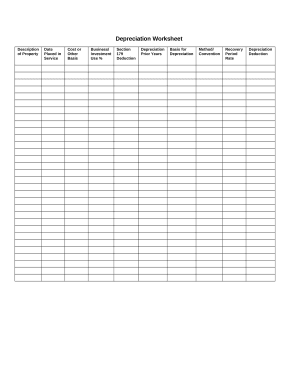
Depreciation Worksheet Description of Property Date Placed in Service Cost or Other BasisBusiness/ Investment Use %Section 179 DeductionDepreciation Prior YearsBasis for DepreciationMethod/ ConventionRecovery Period RateDepreciation Deduction.

How it works

  1. Open form

    Open form follow the instructions

  2. Easily sign form

    Easily sign the form with your finger

  3. Share form

    Send filled & signed form or save

How to fill out the Depreciation Worksheet online

The Depreciation Worksheet is a vital tool for users to calculate the depreciation of their assets effectively. This guide provides clear, step-by-step instructions to help you fill out the worksheet online, ensuring accurate reporting of your property’s depreciation.

Follow the steps to complete your Depreciation Worksheet online.

  1. Click the ‘Get Form’ button to obtain the worksheet and open it in your online editing tool.
  2. Begin by filling out the 'Description of Property' field. Enter a clear and concise description of the asset you are reporting. This helps in identifying the property during assessments.
  3. In the 'Date Placed in Service' section, input the date you started using the asset for business or investment purposes. This date is critical for determining the start of the depreciation period.
  4. Next, provide the 'Cost or Other Basis' of the property. This should include the purchase price and any additional costs necessary to make the asset usable.
  5. Enter the 'Business/Investment Use %'. Specify the percentage of time the asset will be used for business or investment activities. This figure impacts the allowable depreciation deduction.
  6. If applicable, include the 'Section 179 Deduction' amount. This deduction allows users to deduct the full cost of the asset in the year it is placed in service, subject to certain limits.
  7. In the 'Depreciation Prior Years' section, provide any depreciation amounts that have been recorded in previous years. This ensures that calculations are based on the correct adjusted basis.
  8. Fill out the 'Basis for Depreciation', which is the remaining value of the asset after accounting for prior depreciation and Section 179 deductions.
  9. Select the 'Method/Convention' for recording depreciation. Common methods include straight-line and declining balance, which determine how depreciation is calculated over time.
  10. Complete the 'Recovery Period Rate'. This is the timeframe over which the asset will be depreciated, according to tax law guidelines.
  11. Finally, calculate and enter the 'Depreciation Deduction' amount for the current year. Ensure all necessary fields are reviewed before finalizing.

Once completed, be sure to save, download, print, or share your Depreciation Worksheet online.

Get form

Experience a faster way to fill out and sign forms on the web. Access the most extensive library of templates available.
Get form

Related content

Instructions for Form 4562 (2020) | Internal...
A deduction for any vehicle reported on a form other than Schedule C (Form 1040), Profit...
Learn more
Effects of a shortened depreciation schedule on...
15 Jul 2021 — We investigate and compare several generic depreciation methods to assess...
Learn more
Alternative minimum tax - Wikipedia
Example calculation · Specifics and adjustments · "Patches" to tax rates and exemptions...
Learn more

Related links form

Holcimawards Project Application Confirmation - MIT Zero Configuration Name Services For IP Networks - CiteSeer FW: MIT Order For Pseudoinelepis SP L152 Equipment - MIT

Questions & Answers

Get answers to your most pressing questions about US Legal Forms API.

Contact support

IRS Form 4562 is used to claim deductions for the depreciation or amortization of tangible or intangible property. Assets such as buildings, machinery, equipment (tangible), or patents (intangible) qualify. Land cannot depreciate, and so it can not be reported on the form.

You'll need three columns: The first column registers the depreciation deduction (aka depreciation expense) you plan to take each year. ... The second column shows the depreciation that has accumulated at the end of each year. The third column logs the book value of the asset at the end of each year.

You'll need to file Form 4562 for every year that you continue to depreciate your asset.

You subtract the salvage value from the cost basis. Divide that number by the number of years of useful life. This will give you your annual depreciation deduction under the straight-line method.

Get This Form Now!

Use professional pre-built templates to fill in and sign documents online faster. Get access to thousands of forms.
Get form
If you believe that this page should be taken down, please follow our DMCA take down processhere.

Industry-leading security and compliance

US Legal Forms protects your data by complying with industry-specific security standards.
  • In businnes since 1997
    25+ years providing professional legal documents.
  • Accredited business
    Guarantees that a business meets BBB accreditation standards in the US and Canada.
  • Secured by Braintree
    Validated Level 1 PCI DSS compliant payment gateway that accepts most major credit and debit card brands from across the globe.
Get Depreciation Worksheet
Get form
  • Adoption
  • Bankruptcy
  • Contractors
  • Divorce
  • Home Sales
  • Employment
  • Identity Theft
  • Incorporation
  • Landlord Tenant
  • Living Trust
  • Name Change
  • Personal Planning
  • Small Business
  • Wills & Estates
  • Packages A-Z
  • Affidavits
  • Bankruptcy
  • Bill of Sale
  • Corporate - LLC
  • Divorce
  • Employment
  • Identity Theft
  • Internet Technology
  • Landlord Tenant
  • Living Wills
  • Name Change
  • Power of Attorney
  • Real Estate
  • Small Estates
  • Wills
  • All Forms
  • Forms A-Z
  • Form Library
  • Legal Hub
  • About Us
  • Help Portal
  • Legal Resources
  • Blog
  • Affiliates
  • Contact Us
  • Delete My Account
  • Site Map
  • Industries
  • Forms in Spanish
  • Localized Forms
  • State-specific Forms
  • Forms Kit
  • Real Estate Handbook
  • All Guides
  • Notarize
  • Incorporation services
  • For Consumers
  • For Small Business
  • For Attorneys
  • USLegal
  • FormsPass
  • pdfFiller
  • signNow
  • altaFlow
  • DocHub
  • Instapage
Form Packages
  • Adoption
  • Bankruptcy
  • Contractors
  • Divorce
  • Home Sales
  • Employment
  • Identity Theft
  • Incorporation
  • Landlord Tenant
  • Living Trust
  • Name Change
  • Personal Planning
  • Small Business
  • Wills & Estates
  • Packages A-Z
Form Categories
  • Affidavits
  • Bankruptcy
  • Bill of Sale
  • Corporate - LLC
  • Divorce
  • Employment
  • Identity Theft
  • Internet Technology
  • Landlord Tenant
  • Living Wills
  • Name Change
  • Power of Attorney
  • Real Estate
  • Small Estates
  • Wills
  • All Forms
  • Forms A-Z
  • Form Library
Customer Service
  • Legal Hub
  • About Us
  • Help Portal
  • Legal Resources
  • Blog
  • Affiliates
  • Contact Us
  • Delete My Account
  • Site Map
  • Industries
  • Forms in Spanish
  • Localized Forms
  • State-specific Forms
  • Forms Kit
Legal Guides
  • Real Estate Handbook
  • All Guides
Prepared for you
  • Notarize
  • Incorporation services
Our Customers
  • For Consumers
  • For Small Business
  • For Attorneys
Our Sites
  • USLegal
  • FormsPass
  • pdfFiller
  • signNow
  • altaFlow
  • DocHub
  • Instapage
Social Media
Call us now toll free:
+1 833 426 79 33
As seen in:
© Copyright 1999-2026 airSlate Legal Forms, Inc. 3720 Flowood Dr, Flowood, Mississippi 39232
  • Your Privacy Choices
  • Terms of Service
  • Privacy Notice
  • Content Takedown Policy
  • Bug Bounty Program