Loading
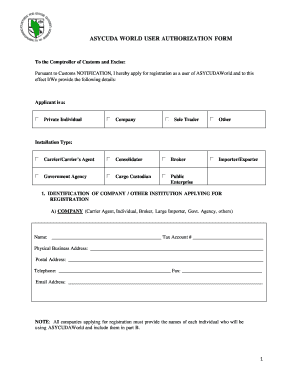
Get Asycuda World User Authorization Form - Dominica Customs
How it works
-

Open form follow the instructions
-

Easily sign the form with your finger
-

Send filled & signed form or save
How to use or fill out the Asycuda World User Authorization Form - Dominica Customs online
This guide provides clear and comprehensive instructions for filling out the Asycuda World User Authorization Form for Dominica Customs. Whether you are an individual or represent a company, this step-by-step approach ensures that you complete the form accurately and successfully.
Follow the steps to fill out the Asycuda World User Authorization Form
- Press the ‘Get Form’ button to access the Asycuda World User Authorization Form, which you will open in a suitable editor.
- Begin by selecting the applicant type. Indicate whether the applicant is a private individual, company, sole trader, or other.
- Provide the details of the company or institution applying for registration in section A. Fill in the name, tax account number, physical and postal addresses, telephone number, fax number, and email address.
- In section B, list the individuals who will access the ASYCUDAWorld system. Include their names, positions, telephone numbers, and email addresses. Ensure all employees of the company are included.
- Confirm that your equipment meets the technical requirements for registration by checking 'Yes' or leaving the box blank for 'No' for each requirement listed.
- Acknowledge that a qualified IT person is available for software installation needs related to ASYCUDAWorld.
- Review the general conditions for registration carefully. Ensure that you understand and agree to notify Customs within the specified time frame of any changes in circumstances.
- Sign the application, providing the name of the applicant, their signature, date, and company seal if applicable.
- Once all fields are completed, save your changes, and you may choose to download, print, or share the completed form as necessary.
Complete the Asycuda World User Authorization Form online to ensure efficient processing.
The Cargo Manifest is the first step in the Customs clearance process and shall be submitted to Customs using ASYCUDA World. The main purpose of the Cargo manifest is to provide necessary information about cargo for transport, commercial and regulatory reasons.
Industry-leading security and compliance
US Legal Forms protects your data by complying with industry-specific security standards.
-
In businnes since 199725+ years providing professional legal documents.
-
Accredited businessGuarantees that a business meets BBB accreditation standards in the US and Canada.
-
Secured by BraintreeValidated Level 1 PCI DSS compliant payment gateway that accepts most major credit and debit card brands from across the globe.