Loading
Form preview
  • US Legal Forms
  • Other Templates
  • More Forms
  • More Multi-State Forms
  • Self-identification Form For Equal Employment Opportunity Reporting - Oregon

Get Self-identification Form For Equal Employment Opportunity Reporting - Oregon

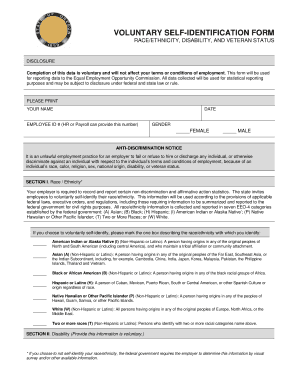
VOLUNTARY SELFIDENTIFICATION FORM RACE/ETHNICITY, DISABILITY, AND VETERAN STATUS DISCLOSURE Completion of this data is voluntary and will not affect your terms or conditions of employment. This form.

How it works

  1. Open form

    Open form follow the instructions

  2. Easily sign form

    Easily sign the form with your finger

  3. Share form

    Send filled & signed form or save

How to fill out the Self-Identification Form For Equal Employment Opportunity Reporting - Oregon online

The Self-Identification Form for Equal Employment Opportunity Reporting is a voluntary document designed to collect demographic information for statistical reporting purposes. This guide will help you navigate the process of filling out the form online with clear and supportive instructions.

Follow the steps to fill out the form effectively

  1. Click the ‘Get Form’ button to obtain the form and open it in your preferred editor.
  2. In the first section, you will need to print your name, date, and employee ID number. If you're unsure of your employee ID, you may obtain this information from your human resources or payroll department.
  3. Next, select your gender by marking the appropriate box next to either 'Female' or 'Male'.
  4. Read the anti-discrimination notice carefully to understand your rights and the implications of filling out this form.
  5. Proceed to Section I, where you will identify your race/ethnicity. Review the categories provided and mark the single box that best describes your identity. Options include American Indian or Alaska Native, Asian, Black or African American, Hispanic or Latino, Native Hawaiian or Other Pacific Islander, White, or Two or More Races.
  6. In Section II, voluntarily disclose whether you are a person with a disability by selecting 'Yes' or 'No'. Refer to the definition provided to assess whether your condition qualifies.
  7. Move on to Section III, where you will indicate whether you have served in the United States military by selecting 'Yes' or 'No'. Remember that additional paperwork may be necessary for veteran preference points.
  8. After completing the form, review all your entries for accuracy. You can then save your changes, download the form, print it, or share it as needed.

Complete your Self-Identification Form online today to help ensure accurate data collection for equal employment opportunity reporting.

Get form

Experience a faster way to fill out and sign forms on the web. Access the most extensive library of templates available.
Get form

Related content

Self-Identification form for Equal Employment...
If you choose to not self-identify your race/ethnicity, the federal government ... for...
Learn more
Affirmative Action - Human Resources - University...
Based on all applicable Equal Employment Opportunity/Affirmative Action laws, ... new...
Learn more
Reporting Manual for the Case Service Report...
Jun 30, 2016 — 9 Individual did not self-identify his/her race. 3. Asian. Report: Either...
Learn more

Related links form

CSSAC Dependent Grant Application ENTRY FORMRELEASE - Princeton PROGRAM IN HELLENIC STUDIES The James W - St. Cloud State University - Stcloudstate

Questions & Answers

Get answers to your most pressing questions about US Legal Forms API.

Contact support

Gender self-identification is the concept that a person's legal sex or gender should be determined by their gender identity without any medical requirements, such as via statutory declaration.

What is self-identification? The government defines self-identification categories, and they include: gender, race, ethnicity, disability, and veteran status.

Form: SF100 This is a list of all GSA forms. These are most often used by GSA employees, contractors and customers. Standard Forms (SF) This is a list of standard government forms that start with the letters "SF". Optional Forms (OF)

: the act of identifying yourself as a particular kind of person.

Self-identification is when an employee discloses their diversity identity to their employer, including race/ethnicity, LGBTQ, veteran status, or disability status.

Self-Identified Gender Identity is a new field in VA records. It is how you think about yourself. Options are male, female, transman, transwoman, other, or choose not to answer. This field will be blank until you update it and can be changed as needed.

Self-identification helps enable organizations to: Facilitate the dialogue at all levels around diversity goals. Create programs that support diverse employees.

What is self-identification? The government defines self-identification categories, and they include: gender, race, ethnicity, disability, and veteran status.

Get This Form Now!

Use professional pre-built templates to fill in and sign documents online faster. Get access to thousands of forms.
Get form
If you believe that this page should be taken down, please follow our DMCA take down processhere.
Get Self-Identification Form For Equal Employment Opportunity Reporting - Oregon
Get form
  • Adoption
  • Bankruptcy
  • Contractors
  • Divorce
  • Home Sales
  • Employment
  • Identity Theft
  • Incorporation
  • Landlord Tenant
  • Living Trust
  • Name Change
  • Personal Planning
  • Small Business
  • Wills & Estates
  • Packages A-Z
  • Affidavits
  • Bankruptcy
  • Bill of Sale
  • Corporate - LLC
  • Divorce
  • Employment
  • Identity Theft
  • Internet Technology
  • Landlord Tenant
  • Living Wills
  • Name Change
  • Power of Attorney
  • Real Estate
  • Small Estates
  • Wills
  • All Forms
  • Forms A-Z
  • Other Templates
  • Legal Hub
  • About Us
  • Help Portal
  • Legal Resources
  • Blog
  • Affiliates
  • Contact Us
  • Delete My Account
  • Site Map
  • Industries
  • Forms in Spanish
  • Localized Forms
  • State-specific Forms
  • Forms Kit
  • Real Estate Handbook
  • All Guides
  • Notarize
  • Incorporation services
  • For Consumers
  • For Small Business
  • For Attorneys
  • USLegal
  • FormsPass
  • pdfFiller
  • signNow
  • altaFlow
  • DocHub
  • Instapage
Form Packages
  • Adoption
  • Bankruptcy
  • Contractors
  • Divorce
  • Home Sales
  • Employment
  • Identity Theft
  • Incorporation
  • Landlord Tenant
  • Living Trust
  • Name Change
  • Personal Planning
  • Small Business
  • Wills & Estates
  • Packages A-Z
Form Categories
  • Affidavits
  • Bankruptcy
  • Bill of Sale
  • Corporate - LLC
  • Divorce
  • Employment
  • Identity Theft
  • Internet Technology
  • Landlord Tenant
  • Living Wills
  • Name Change
  • Power of Attorney
  • Real Estate
  • Small Estates
  • Wills
  • All Forms
  • Forms A-Z
  • Other Templates
Customer Service
  • Legal Hub
  • About Us
  • Help Portal
  • Legal Resources
  • Blog
  • Affiliates
  • Contact Us
  • Delete My Account
  • Site Map
  • Industries
  • Forms in Spanish
  • Localized Forms
  • State-specific Forms
  • Forms Kit
Legal Guides
  • Real Estate Handbook
  • All Guides
Prepared for you
  • Notarize
  • Incorporation services
Our Customers
  • For Consumers
  • For Small Business
  • For Attorneys
Our Sites
  • USLegal
  • FormsPass
  • pdfFiller
  • signNow
  • altaFlow
  • DocHub
  • Instapage
Social Media
Call us now toll free:
+1 833 426 79 33
As seen in:
© Copyright 1999-2026 airSlate Legal Forms, Inc. 17 Station Street, Suite 303, Brookline, MA 02445
  • Your Privacy Choices
  • Terms of Service
  • Privacy Notice
  • Content Takedown Policy
  • Bug Bounty Program