Get Md Icd-072 2013-2026
How it works
-

Open form follow the instructions
-

Easily sign the form with your finger
-

Send filled & signed form or save
How to fill out the MD ICD-072 online
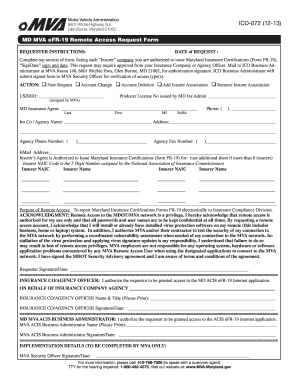
The MD ICD-072 is an essential form used for requesting remote access to the Maryland Insurance Certifications system. This guide will provide you with clear, step-by-step instructions on how to complete the online version of this form effectively.
Follow the steps to fill out the MD ICD-072 online successfully.
- Press the ‘Get Form’ button to obtain the form and open it in the online editor.
- Enter the date of your request at the top of the form.
- In the top section, list each ‘Insurer’ company that you are authorized to issue Maryland Insurance Certifications (Form FR-19) for.
- Sign and date in the ‘SignDate’ section, making sure you have the necessary approvals from your insurance company or agency officer if required.
- Select the appropriate action by marking one of the following options: New Request, Account Change, Account Deletion, Add Insurer Association, or Remove Insurer Association.
- Fill in the USERID assigned by the Maryland Vehicle Administration (MVA).
- Provide your Producer License Number issued by the Maryland Insurance Administration.
- Enter your MD Insurance Agent's name in the designated fields, including last name, first name, middle initial, and suffix.
- Fill out your phone number in the provided format.
- Write the insurance company or agency name, followed by the complete address.
- Provide the agency's phone number and fax number.
- Enter your email address for further communication.
- Document the insurers you are authorized to issue certifications for, including their NAIC codes; use additional sheets if needed.
- In the ‘Purpose of Remote Access’ section, confirm your intention to report Maryland Insurance Certifications Forms FR-19 electronically.
- Acknowledge the terms regarding remote access and sign at the bottom of the requestor section, dating the signature.
- Ensure that an insurance company or agency officer signs and dates their authorization in the specified area.
- Obtain the signature and date from the Maryland Vehicle Administration ACIS Business Administrator to complete the authorization process.
- Once all information is filled out and confirmed, save your changes, download the completed form, print it, or share it as necessary.
Complete your MD ICD-072 form online today for efficient processing.
The FR 19 form is a crucial document in Maryland that verifies your compliance with auto insurance laws after a lapse. If your insurance lapses, this form provides proof of new coverage to the Maryland state authorities. Understanding the significance of this form, especially in relation to MD ICD-072, is essential to maintain your driving privileges. For help with obtaining or filing this form, consider accessing the resources on uslegalforms.