Loading
Get Ngb Form 22
How it works
-

Open form follow the instructions
-

Easily sign the form with your finger
-

Send filled & signed form or save
How to fill out the Ngb Form 22 online
Filling out the Ngb Form 22 online is a vital process for service members requesting a conditional release to another component of Military Service. This guide provides a clear, step-by-step approach to ensure that users can complete the form accurately and efficiently.
Follow the steps to fill out the Ngb Form 22 online effectively.
- Click ‘Get Form’ button to obtain the Ngb Form 22 and open it in your preferred editor.
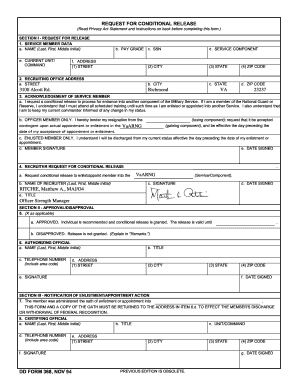
- In Section I, start by entering the service member data. Fill in the individual's name (last, first, middle initial), Social Security Number, service component, city, state, and ZIP code.
- Provide the recruiting office address by entering the street, city, state, and ZIP code as required.
- Reply to the acknowledgment section. The member must indicate their agreement to the conditional release requirements and provide their signature and the date signed.
- For the recruiter’s section, the recruiter must complete their details including name, signature, title, and date signed.
- Section II should be filled out by the applicant's unit commander. Indicate if the request is approved or disapproved and fill in the necessary details.
- In Section III, upon enlistment or appointment, ensure the service to which the applicant was appointed is mentioned, along with certification from the certifying official.
- Use Section IV for any necessary remarks, referencing any specific items on the form as needed.
- Once all sections are complete, save your changes. You can then download, print, or share the completed Ngb Form 22 for submission.
Complete your documents online today for a smooth filing experience.
Members of the National Guard are not required to complete NGB Form 22. But they will need to sign it when they're discharged. If you've lost your form (or you never received one), you'll need to contact the National Guard Adjutant's Office for your particular state.