Loading
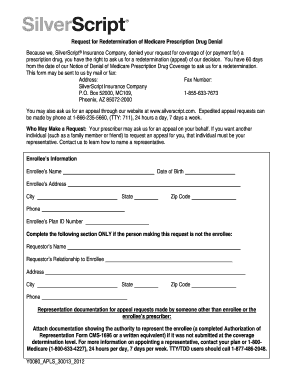
Get Silverscript Appeal Form
How it works
-

Open form follow the instructions
-

Easily sign the form with your finger
-

Send filled & signed form or save
How to fill out the Silverscript Appeal Form online
Filing an appeal can feel overwhelming, but understanding how to complete the Silverscript Appeal Form online can make the process smoother. This guide provides clear, step-by-step instructions tailored to meet your needs and help you successfully submit your appeal.
Follow the steps to fill out the Silverscript Appeal Form correctly.
- Press the 'Get Form' button to acquire the Silverscript Appeal Form and open it in your chosen editing tool.
- Begin by providing your enrollee information. Fill in your name, date of birth, address, city, state, zip code, and phone number. It's important to ensure accuracy in these details to avoid any delays.
- Enter your enrollee's plan ID number. This information is crucial for identifying your coverage.
- If the request is being made by someone other than the enrollee, fill out the requestor's information, including their name, relationship to the enrollee, address, city, state, zip code, and phone number.
- If applicable, attach any required representation documentation. For requests made by representatives, include a completed Authorization of Representation Form CMS-1696 or an equivalent written documentation.
- Provide the details of the prescription drug for which you are appealing. Include the drug name, strength, quantity, and dose.
- Indicate whether you have purchased the drug pending appeal by selecting 'Yes' or 'No.' If 'Yes,' provide the purchase date and amount paid, and attach a copy of your receipt.
- Include the name and contact number of the pharmacy that dispensed the drug.
- Complete the prescriber's information section with their name, address, office phone number, and fax number.
- If applicable, check the box to request an expedited decision if waiting could harm your health. Provide supporting statements from your prescriber if available.
- In the section provided, explain your reasons for appealing. Attach additional pages if needed and include any additional information that may be relevant, such as medical records.
- Finally, sign and date the form to confirm that the information provided is accurate. Ensure that you have saved your changes before submitting the form.
- After completing the form, you can save your changes, download a copy for your records, print the form, or share it with others as necessary.
Complete the Silverscript Appeal Form online today to ensure your appeal is submitted timely.
Part D plans use tiers to categorize prescription drugs. Higher tiers are more expensive and have higher cost-sharing amounts. Each plan sets its own tiers, and plans may change their tiers from year to year. If you cannot afford your copay, you can ask for a tiering exception by using the Part D appeal process.