Loading
Get 40x
How it works
-

Open form follow the instructions
-

Easily sign the form with your finger
-

Send filled & signed form or save
How to fill out the 40x online
Filling out the 40x online can streamline the process of amending your Alabama individual income tax return or applying for a refund. This guide provides clear, step-by-step instructions to help users efficiently complete the form.
Follow the steps to successfully complete your 40x form online.
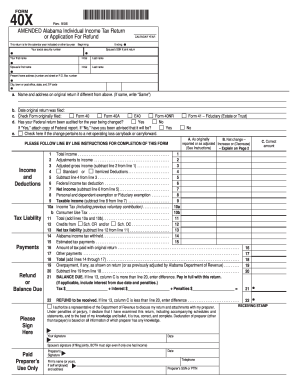
- Click ‘Get Form’ button to obtain the 40x form and open it in your editor.
- Begin by entering the calendar year for the return in the designated field. Ensure you accurately reflect the tax year you are amending.
- Fill in your social security number in the appropriate section, and if you are filing jointly, include your partner’s social security number as well.
- Enter your first name, initial, and last name. If filing jointly, repeat this for your partner.
- Provide your current home address, including the street number and name or P.O. Box, along with your city, state, and ZIP code.
- If the name and address on your original return is different, provide that information in the space provided. If it is the same, write 'Same.'
- Indicate the date on which the original return was filed.
- Select the type of form originally filed by checking the corresponding box — Form 40, Form 40A, E40, or Form 40NR.
- Specify if a federal return has been audited for the year being amended by checking 'Yes' or 'No.' If 'Yes,' be prepared to attach a copy of the federal report.
- If applicable, check the box if the change relates to a net operating loss carryback or carryforward.
- Complete the income and deductions section, where you will fill out total income, adjustments to income, and any deductions. Follow the prompts to calculate adjusted gross income and taxable income.
- In the tax liability section, calculate and fill in your income tax, consumer use tax, and any credits.
- Proceed to the payments section where you will enter any Alabama income tax withheld, estimated tax payments, and other payments made. Summarize these totals.
- State whether there is a balance due or a refund to be received, based on the calculations in previous steps.
- Sign and date the form at the bottom for yourself and your partner if filing jointly. Include the preparer's signature if applicable.
- Provide any additional explanations for changes in the designated section on page 2.
- Finally, review your form for accuracy, then save the changes and download or print a copy for your records.
Complete and file your documents online today to ensure a smooth and efficient tax amendment process.
Connect the Tascam to a computer using the USB cable. Use the – button to select 'Storage' and press enter (>). The computer will recognise the Tascam just like a digital camera or memory stick. The sound files are in the Music folder and you can either copy and paste or drag and drop them onto the computer.