Loading
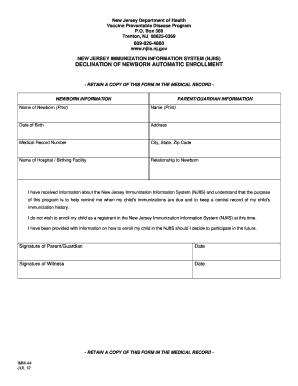
Get Https Njiis Nj Gov
How it works
-

Open form follow the instructions
-

Easily sign the form with your finger
-

Send filled & signed form or save
How to fill out the Https Njiis Nj Gov online
Filling out the Https Njiis Nj Gov form is an important process for parents or guardians who need to decline enrollment in the New Jersey Immunization Information System. This guide provides clear, step-by-step instructions to help you complete the form accurately and efficiently.
Follow the steps to complete the form effectively.
- Press the ‘Get Form’ button to access the form and open it in your preferred editing tool.
- Begin by entering the name of the newborn in the designated section. Ensure you print the name clearly to avoid any confusion.
- Next, fill in the name of the parent or guardian. Remember to print this name as well.
- Provide the date of birth of the newborn. It's essential to enter this information accurately for proper record-keeping.
- Complete the address section, including the city, state, and zip code. This information is crucial for maintaining communication.
- Input the medical record number of the newborn, if applicable. This helps link the form to existing health records.
- Specify the name of the hospital or birthing facility where the newborn was delivered.
- Indicate your relationship to the newborn in the provided area. This clarifies your authority to make decisions regarding the child’s health.
- Review the statement regarding the New Jersey Immunization Information System to ensure you understand its purpose.
- Select your choice to decline enrollment by acknowledging that you do not wish to register your child in the NJIIS at this time.
- Provide your signature as the parent or guardian, along with the date of signing. This step confirms your decision.
- A witness must also sign the form, along with the date, affirming the validity of the information provided.
- Once all sections are completed, save the document, and you may choose to print, download, or share the form as needed.
Complete your form online today and ensure your preferences are accurately recorded.
The Docket app is now available in the App store or on Google Play in English or Spanish depending on Smartphone settings. Individuals with an email or phone number on file with the New Jersey Immunization Information System can access and download their COVID-19 vaccination record using the app.