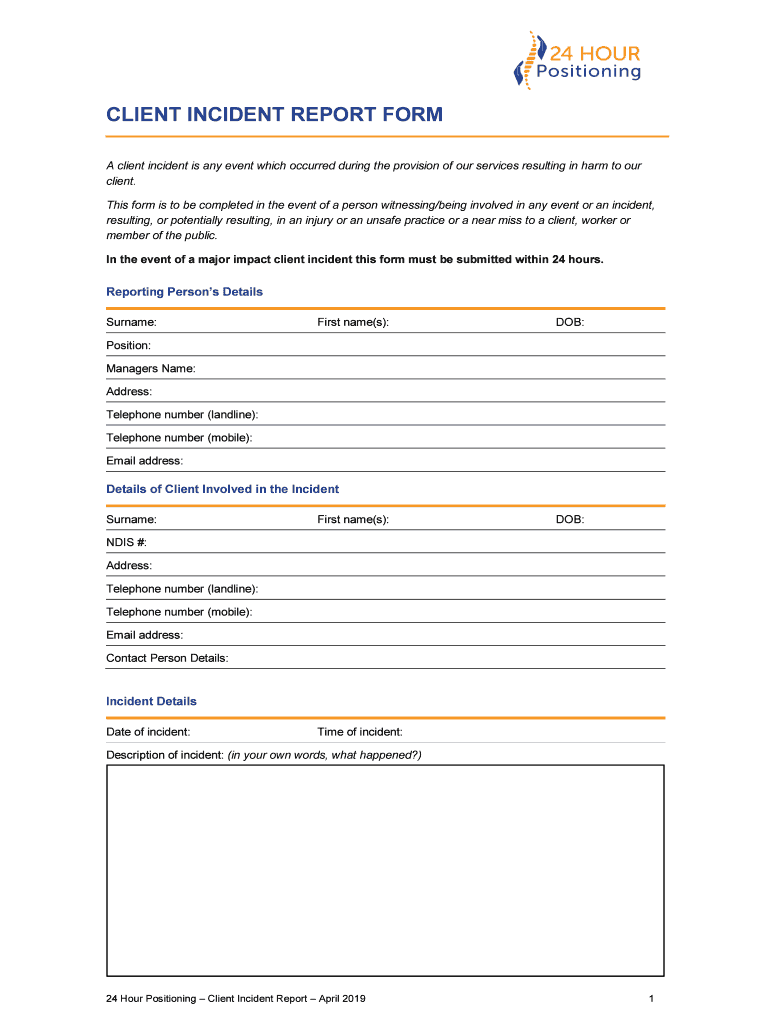
CLIENT INCIDENT REPORT FORM A client incident is any event which occurred during the provision of our services resulting in harm to our client. This form is to be completed in the event of a person.
Loading

Open form follow the instructions

Easily sign the form with your finger

Send filled & signed form or save
How to fill out the AU 24 Hour Positioning Client Incident Report Form online
Filling out the AU 24 Hour Positioning Client Incident Report Form online is a crucial part of documenting incidents and ensuring proper communication within your organization. This guide provides step-by-step instructions to help you complete the form efficiently and accurately.
Follow the steps to complete the form online with ease.
- Click ‘Get Form’ button to obtain the form and open it in your preferred editing environment.
- Begin by filling out the reporting person’s details. This includes the surname, first name(s), date of birth, position, manager's name, address, landline and mobile telephone numbers, and email address.
- Next, provide details of the client involved in the incident. Include their surname, first name(s), date of birth, NDIS number, address, landline and mobile telephone numbers, email address, and contact person details.
- Fill out the incident details. Specify the date and time of the incident, and provide a description of the incident in your own words. Clearly detail what occurred to ensure accurate reporting.
- Indicate the location of the incident to provide context on where it took place.
- List the names and contact information of witnesses to the incident. Ensure to include multiple witness names and contacts if applicable.
- Document the details of any injuries sustained. For each injured person, include their name, type of injury, and the treatment received.
- Specify if any other persons were involved in the incident. If yes, provide their names and contact details.
- Respond to whether damage to property occurred. If damage is present, provide details of the damage.
- Complete the section regarding other details. Indicate if the police or NSW Work Cover were involved, if this is a workers' compensation related incident, if it is a major impact client related incident, and any notifications that need to be made to external agencies. Provide the necessary details for any involvement.
- Once all fields are completed, review the form for accuracy. Users can then save the changes, download a copy, print it out, or share the completed form as necessary.
Complete your documents online and ensure prompt reporting of incidents.
Experience a faster way to fill out and sign forms on the web. Access the most extensive library of templates available.
Related content
by G Haller · 2007 · Cited by 58 — Clinicians documented 85.1% of procedures on the...
by C Wiskow · Cited by 40 — cognitively or behaviourally disturbed persons or in...
Jan 1, 2015 — Police reports or court documents or other legal documentation of the...
Get answers to your most pressing questions about US Legal Forms API.
What is the client incident management summary guide?
The Client incident management summary guide is to assist staff who are reporting an incident which impacts on a client. ing to the Client incident management guide, all in-scope services are required to report an incident that occurred during service delivery and resulted in harm to a client.
What is customer incident report?
The CIR is a point-in-time document that is intended to convey a specific set of information about an impacting incident. The interim CIR document provides the current findings of the ongoing RCA, the next investigative steps, and a timeline for the next expected update.
What is the purpose of a incident report?
The purpose of incident reporting is to record an incident, determine its possible cause, document any actions taken, and make it known to stakeholders. An incident report can be used in the investigation and analysis of an event.
What is a client incident?
A client incident is any event or circumstance that occurred during service delivery and resulted in harm to a client.
What is a client incident report?
Client Incidents are recorded on the Journals tab of Client records and are designed to record details specific to an Incident including Incident Type, Category Level, Precursor to the Incident, what happened, and the outcome.
What does an incident report include?
Basic Incident Information the names of any witnesses. the exact location and/or address of the incident. the exact time and date of the occurrence. a detailed and clear description of what exactly happened.
Use professional pre-built templates to fill in and sign documents online faster. Get access to thousands of forms.
If you believe that this page should be taken down, please follow our DMCA take down process here.