Loading
Get Doc Cd-342 2009-2026
How it works
-

Open form follow the instructions
-

Easily sign the form with your finger
-

Send filled & signed form or save
How to fill out the DoC CD-342 online
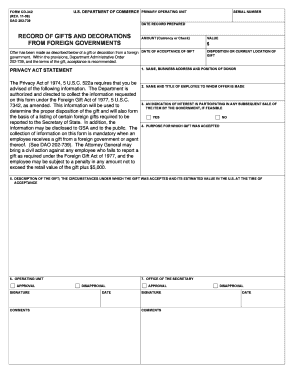
Completing the DoC CD-342 form online is an important process for reporting gifts and decorations received from foreign governments. This guide provides step-by-step instructions to help users navigate each section of the form confidently.
Follow the steps to accurately complete the DoC CD-342 online.
- Click the ‘Get Form’ button to obtain the form and open it for editing.
- Enter the serial number at the top of the form. This number helps identify the record distinctly within the database.
- Fill in the date record prepared. Be sure to use the format designated on the form.
- Complete the section labeled 'amount (currency or check).' Indicate the total value of the gift or decoration received.
- Provide your assessment of the value in the designated field. Make sure the amount is expressed in U.S. currency.
- In the 'date of acceptance of gift' field, input the date when you officially accepted the gift.
- Fill out the section for 'name, business address, and position of donor.' This identifies the individual or entity that provided the gift.
- Indicate the disposition or current location of the gift by providing a brief description.
- For the 'name and title of employee to whom offer is made,' enter your name and title as the recipient of the gift.
- Address the question regarding participation in any subsequent sale of the item by selecting 'yes' or 'no' as applicable.
- Describe the purpose for which the gift was accepted in the appropriate field.
- Provide a thorough description of the gift, including the circumstances under which it was accepted and its estimated value at that time.
- Identify the operating unit. This refers to the specific department or area that will manage the disposition of the gift.
- After completion, sign where indicated for approval. You may also add any comments if necessary.
- Check the office of the secretary section for any potential disapproval and complete that part if needed.
- Once all fields are filled out and reviewed for accuracy, save changes to the document. You may then download, print, or share the finished form as needed.
Complete your DoC CD-342 form online today to ensure proper reporting and compliance.