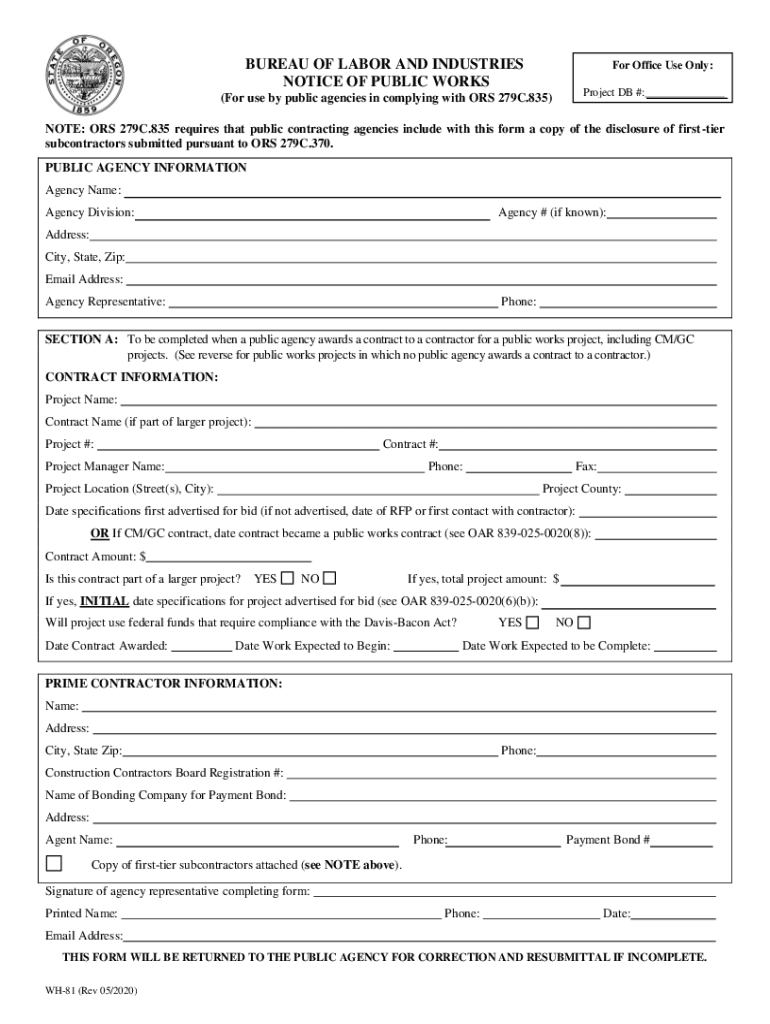
BUREAU OF LABOR AND INDUSTRIES NOTICE OF PUBLIC WORKSFor Office Use Only: Project DB #:(For use by public agencies in complying with ORS 279C.835)NOTE: ORS 279C.835 requires that public contracting.
Loading

Open form follow the instructions

Easily sign the form with your finger

Send filled & signed form or save
How to use or fill out the IMPORTANT NOTICES AND DISCLAIMERS ... - Academia.edu online
This guide provides a clear, step-by-step approach to filling out the IMPORTANT NOTICES AND DISCLAIMERS form effectively. It is designed to assist users, regardless of their legal experience, in understanding each part of the form and ensuring accurate completion.
Follow the steps to fill out the form accurately.
- Use the ‘Get Form’ button to obtain the document. This will open the form in your preferred document editor.
- Begin by filling out the public agency information section. Enter the agency name, division, address, city, state, zip code, email address, agency representative's name, and phone number.
- Complete the contract information section. Include the project name, contract name (if applicable), project number, contract number, project manager's name and contact information, project location, and project county.
- Provide details on the specifications advertising date, contract amount, if applicable, and whether the contract is part of a larger project. Also, indicate if federal funds are used and the contract and work start dates.
- Fill out the prime contractor information section. Include the contractor's name, address, phone number, licensing registration number, bonding company information, and payment bond number.
- Attach a copy of the first-tier subcontractors' disclosure form as required. Ensure all sections are completed to prevent the form from being returned for corrections.
- Complete any additional sections (B, C, D, or E) as needed based on the nature of the project. Each section has specific requirements related to the type of public works being reported.
- After completing the form, review it for accuracy, then save changes, download, print, or share the completed document as needed.
Complete your documents online to ensure compliance and streamline your public works reporting.
Experience a faster way to fill out and sign forms on the web. Access the most extensive library of templates available.
Related content
Website Accessibility (Section 508) Disclaimer ... Adobe offers the Adobe Reader for users...
IMPORTANT NOTICES AND DISCLAIMERS CONCERNING NFPA ® STANDARDS NOTICE AND DISCLAIMER OF...
According to a 2014 study by Nature and a 2016 article in Times Higher Education, it is...
Use professional pre-built templates to fill in and sign documents online faster. Get access to thousands of forms.
If you believe that this page should be taken down, please follow our DMCA take down process here.