Loading
Get Registration Sectio N
How it works
-

Open form follow the instructions
-

Easily sign the form with your finger
-

Send filled & signed form or save
How to fill out the Registration Section online
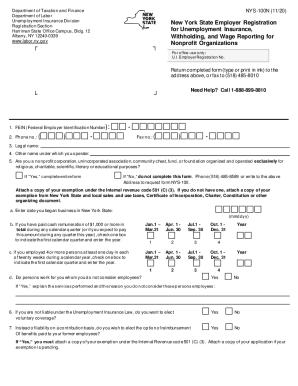
This guide provides clear and supportive instructions on completing the Registration Section for New York State Employer Registration for Unemployment Insurance, Withholding, and Wage Reporting for Nonprofit Organizations. Whether you are new to this process or have some experience, this resource will help you navigate the online form with confidence.
Follow the steps to successfully complete your registration
- Press the ‘Get Form’ button to access the Registration Section form and open it in your chosen online editor.
- Begin by entering your Federal Employer Identification Number (FEIN) in the designated field. This nine-digit number is essential for IRS certification of your payments.
- Answer the question regarding your status as a nonprofit organization. If you answer 'Yes,' complete the rest of the form. If 'No,' you will need a different form; contact the provided phone number.
- Proceed to indicate if you employed four or more persons at least one day in each of twenty weeks during the calendar year, marking the corresponding quarter if necessary.
- Determine whether you want to elect voluntary coverage and mark your choice accordingly.
- If you have acquired business from another employer, complete the fields pertaining to that acquisition.
- List the names, Social Security numbers, and titles of officers in the organization, ensuring that all provided information is accurate.
- For detailed program and location information, answer each part regarding the employment program in New York State carefully.
- Finally, review your completed form to ensure all fields are filled accurately and completely, sign where requested, and provide the date of submission.
- After completing the form, you can save your changes, download a copy for your records, print the form, or share it as needed to ensure proper submission.
Ready to complete your registration? Start filling out the form online today!
The front panel of a pesticide label can include the following eight parts: restricted use pesticide statement; product name, brand, or trademark; ingredient statement; child hazard warning statement; signal word; first aid statement; skull and cross bones symbol and the word “Poison”; and net contents/net weight.