Loading
Get Co Dr 2444 2008-2026
How it works
-

Open form follow the instructions
-

Easily sign the form with your finger
-

Send filled & signed form or save
How to fill out the CO DR 2444 online
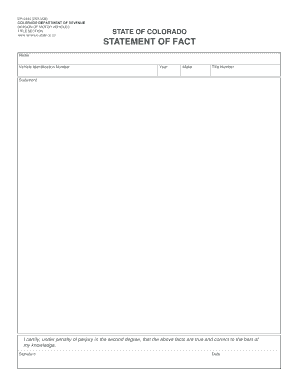
Filling out the CO DR 2444 form is an essential step for individuals needing to provide a statement of fact regarding their vehicle. This guide offers a clear walkthrough for users, ensuring a smooth process for completing the form online.
Follow the steps to easily complete the CO DR 2444 online
- Click ‘Get Form’ button to access the document and open it in your online tool.
- Begin by entering your name in the designated field to identify the individual submitting the form.
- Input the Vehicle Identification Number (VIN) in the appropriate section to specify the vehicle in question.
- Enter the year of the vehicle. This helps in identifying the specific make and model.
- Fill in the make of the vehicle, which refers to the manufacturer name.
- Provide the title number in the corresponding field, which is essential for tracking the vehicle's legal documentation.
- In the statement section, ensure you accurately articulate the facts relevant to your vehicle situation.
- Ceremoniously certify the information by signing in the signature field, confirming that all provided details are true to your knowledge.
- Finally, input the date of signing to complete the certification process.
- After verifying that all fields are correctly filled, you can save your changes, download the form, print it, or share it as needed.
Complete your CO DR 2444 form online today for a seamless experience.
The DR2444 refers to the Colorado Statement of Fact form, which is used for various registration purposes. This form helps clarify specific information related to your vehicle, such as ownership or changes in status. Ensuring you fill out the CO DR 2444 correctly can facilitate smoother transactions at the DMV.