Loading
Get Co Dr 2303 2015-2026
How it works
-

Open form follow the instructions
-

Easily sign the form with your finger
-

Send filled & signed form or save
How to fill out the CO DR 2303 online
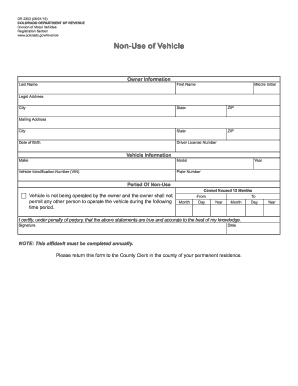
The CO DR 2303 is a crucial form for individuals wishing to declare the non-use of their vehicle in Colorado. This guide provides step-by-step instructions to help you complete this form online with confidence and accuracy.
Follow the steps to successfully complete the CO DR 2303 online.
- Press the ‘Get Form’ button to access the form and open it in your preferred online editor.
- Fill out the owner information section including your last name, first name, middle initial, legal address, city, state, ZIP code, date of birth, and driver license number. Make sure all details are accurate and up-to-date.
- Input the mailing address, if it differs from your legal address, ensuring the city, state, and ZIP code are correctly entered.
- In the vehicle information section, provide the make, model, year, vehicle identification number (VIN), and plate number for the vehicle that you are declaring as not being in use.
- Specify the period of non-use. Indicate the starting and ending dates, ensuring that the duration does not exceed 12 months. Fill in the month, day, and year for both the start and end of the non-use period.
- At the bottom of the form, certify the accuracy of your statements by providing your signature and the date of signing.
- After completing all sections, review the form for any errors. Once confirmed, you can save your changes, download a copy, print the form, or share it as needed.
Complete your CO DR 2303 form online today for a seamless submission process.
Filling out a Colorado statement of fact is straightforward. Start by clearly stating your name and address, followed by the specifics of your situation. Make sure to complete form CO DR 2303, as it may be required for various purposes. If you have any questions or need examples, uslegalforms offers resources to assist you with this process.