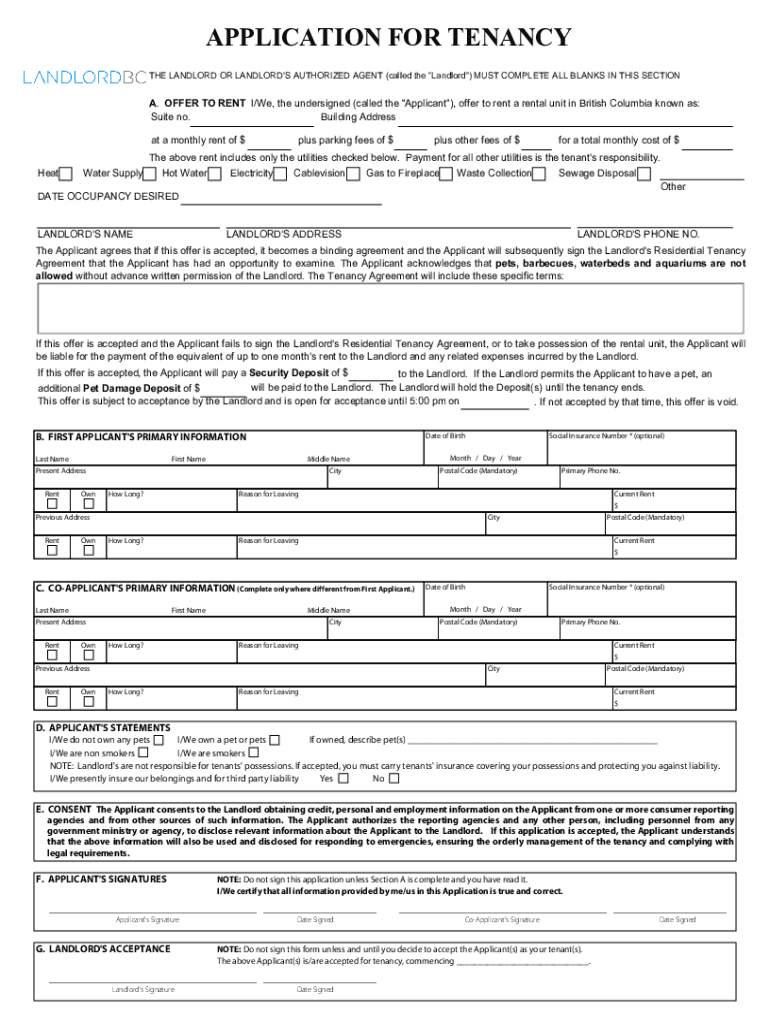
APPLICATION FOR TENANCY INSTRUCTIONS 1. Landlord must complete all of Section A (Offer to Rent). 2. If possible, remainder of form to be completed by Landlord interviewing Applicant. 3. Full legal.
Loading

Open form follow the instructions

Easily sign the form with your finger

Send filled & signed form or save
How to fill out the Rental Application Form Bc online
This guide provides clear and comprehensive instructions for completing the Rental Application Form Bc online. Whether you are a first-time renter or have previous experience, this resource will help you navigate each section with confidence.
Follow the steps to accurately complete your application.
- Click ‘Get Form’ button to obtain the form and open it in the editor.
- Begin by having the landlord complete all fields in Section A, titled ‘Offer to Rent’. This section includes important details about the rental unit, such as suite number, building address, monthly rent, and total costs. Make sure to note the utilities included in the rent.
- Enter the desired occupancy date and landlord's contact information in Section A. Ensure the landlord provides their name, phone number, and address.
- For each applicant, fill out their primary information in Section B and Section C. Include full legal names, date of birth, current and previous addresses, and main reasons for leaving their previous rental properties.
- Complete Section D regarding applicant's statements, indicating whether the applicants own pets, smoke, and if they carry tenant’s insurance.
- In Section E, the applicant provides consent for the landlord to obtain personal and credit information. Ensure you read and agree with this consent before completion.
- Sign and date the application in Section F after confirming that all information is accurate and Section A is complete. If additional applicants are present, ensure they also sign in this section.
- Complete Section G, where the landlord will indicate acceptance of the application. This enables the agreement to be binding.
- For supplementary information, fill in Section H and I for the first applicant and co-applicant respectively. Include additional contact numbers, employment information, and vehicle details.
- List other adult occupants in Section J and minor occupants in Section K who will be living in the rental unit.
- Finally, review all entered information for accuracy. Once everything is complete, you can save changes, download, print, or share the form as needed.
Start your application process by completing the Rental Application Form Bc online today!
Experience a faster way to fill out and sign forms on the web. Access the most extensive library of templates available.
Related content
Division of Charitable Gaming. BC FORM 116. Agreement for the Conduct of Bingo in Leased...
A rental application is the key screening document that landlords give to prospective...
An Estoppel Certificate (or Estoppel Letter) is a document often used in due diligence in...
Get answers to your most pressing questions about US Legal Forms API.
Does a lease automatically go month-to-month in BC?
If the tenancy agreement does not require the tenant to vacate the rental unit at the end of the term, and if the parties do not enter into a new tenancy agreement, the tenancy continues as a month-to-month tenancy1.
How many months notice does a landlord have to give a tenant BC?
The landlord must serve the two-month notice so the tenant receives it: Two months before the move-out date, and. Before the day the rent is due.
What is a month to month rental agreement in BC?
A periodic tenancy agreement – often referred to as a “month-to-month” tenancy agreement – does not have a pre-determined date on which it ends. The tenancy continues until the tenant gives proper notice to move out, or until the landlord legally ends the tenancy.
How do I run a credit check on a tenant in BC?
You can ask that a prospect provide their recent (should be within the month) credit check and history or you can visit https://.tenantverification.ca/fees.html and purchase a "Equifax Credit Report" which will show you the prospect's credit score, open trade lines or credit lines, payment history, level of debt, ...
What do I need to rent in BC?
Before renting to you, landlords need to know if you can pay the rent. Landlords are allowed to check your credit history. Landlords can ask for proof of your income (like a pay stub). They can also ask for other personal information, such as your full name and date of birth.
What documents can a landlord ask for in BC?
Protection of Personal Information It's reasonable to expect landlords to ask potential tenants for certain types of personal information like proof of income, references or identification. This information should only be used for completing the application process – to verify income or perform a credit check.
What is a fixed term tenancy agreement BC?
A fixed term tenancy (or lease) is one that is set for a specific period of time (e.g. a year, a month or a week). At the end of the term of the agreement, the landlord and tenant can agree to another fixed term or the tenancy continues on a month-to-month basis.
Do you need a tenancy agreement in BC?
Landlords are required to prepare a written agreement for every tenancy. Even if a landlord doesn't prepare one, the standard terms of a tenancy agreement still apply. Also, paying a security deposit establishes a tenancy, even if there is no written tenancy agreement and if the tenant never moves in.
Use professional pre-built templates to fill in and sign documents online faster. Get access to thousands of forms.
If you believe that this page should be taken down, please follow our DMCA take down process here.