Loading
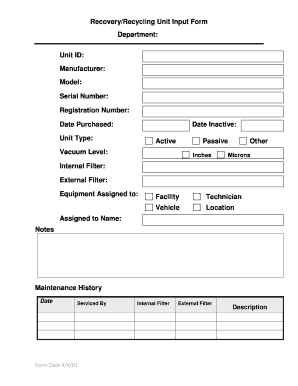
Get Recoveryrecycling Unit Input Form Department - Www-ehs Ucsd
How it works
-

Open form follow the instructions
-

Easily sign the form with your finger
-

Send filled & signed form or save
How to use or fill out the RecoveryRecycling Unit Input Form Department - Www-ehs Ucsd online
Completing the RecoveryRecycling Unit Input Form is a vital step in ensuring accurate documentation of equipment management. This guide will walk you through each section of the form, providing clear instructions to help you fill it out effectively.
Follow the steps to accurately complete the form.
- Click the ‘Get Form’ button to obtain the form and open it in the document editor.
- In the 'Department' field, enter your department's name responsibly, ensuring that it is spelled correctly and accurately represents your unit.
- Fill out the 'Unit ID' to identify the specific equipment being documented. This is essential for tracking purposes.
- Next, provide the 'Manufacturer' of the equipment. This information helps in identifying the origin of the unit.
- In the 'Model' field, input the model number of the equipment. This should match the specifications provided by the manufacturer.
- Complete the 'Serial Number' section to include the unique identification number assigned to the unit.
- Enter the 'Registration Number' if applicable, allowing for proper record keeping within your department.
- Record the 'Date Purchased' to track the acquisition of the equipment accurately.
- Next, indicate the 'Date Inactive' of the equipment, if applicable, to provide information on any units that are no longer in use.
- Select the 'Unit Type' from the options provided, such as Active or Passive, ensuring correct classification.
- For 'Vacuum Level', input the measurement in inches or microns where applicable.
- Specify whether the equipment has an 'Internal Filter' or 'External Filter', and provide details as necessary.
- Fill in the 'Equipment Assigned to' section, choosing from Facility, Technician, Vehicle, or Location.
- Input the name of the individual to whom the equipment is assigned in the 'Assigned to Name'.
- Write any relevant 'Notes' that may assist in future reference regarding the equipment.
- Record the 'Maintenance History' by entering the date and the technician’s name who provided the service.
- Review all entries for accuracy. Once completed, you can save changes, download, print, or share the form as needed.
Ensure accurate equipment documentation by completing your form online today.
Patty Maysent | Chief Executive Officer | UC San Diego Health.
Industry-leading security and compliance
US Legal Forms protects your data by complying with industry-specific security standards.
-
In businnes since 199725+ years providing professional legal documents.
-
Accredited businessGuarantees that a business meets BBB accreditation standards in the US and Canada.
-
Secured by BraintreeValidated Level 1 PCI DSS compliant payment gateway that accepts most major credit and debit card brands from across the globe.