Loading
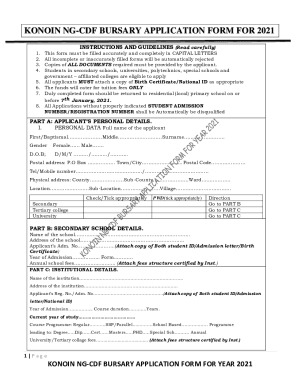
Get Kitui South Bursaries 2021
How it works
-

Open form follow the instructions
-

Easily sign the form with your finger
-

Send filled & signed form or save
How to fill out the Kitui South Bursaries 2021 online
This guide provides a comprehensive approach to completing the Kitui South Bursaries 2021 application form online. Whether you are a first-time applicant or need assistance navigating the form, this resource will assist you in filling out each section accurately and completely.
Follow the steps to successfully complete your application.
- Click the ‘Get Form’ button to access the Kitui South Bursaries 2021 application form.
- In the first section, 'Applicant’s Personal Details', fill in your full name in capital letters in the designated fields for First/Baptismal, Middle, and Surname. Indicate your gender by ticking the appropriate box, and input your date of birth.
- Complete the contact information by providing your postal address, telephone or mobile number, and physical address. Ensure to write down your county, sub-county, ward, location, sub-location, and village. Make sure to review this section for any errors before proceeding.
- In the 'Academic Information' section, indicate your schooling level by selecting the appropriate option and provide your student admission number or registration number. Add any other required information about your educational background.
- Proceed to 'Part B: Secondary School Details', where you will need to indicate the name and address of your secondary school. Be sure to also include your admission number and attach copies of any required documents such as your student ID or admission letter.
- Fill out 'Part C: Institutional Details' by stating the name and address of your current institution. Include your registration number, course duration, and the annual fees, along with any supporting documentation like the fees structure.
- Provide your family's information in 'Part D', detailing both parents' and, if applicable, guardians' details. Fill in their names, ID numbers, postal addresses, and sources of income, and remember to attach any necessary identification copies.
- List all your siblings under 'Sibling Information' by providing their full names, ages, and current school or job information. If applicable, include their class or position in employment.
- Sketch a directional map to your home from the nearest landmark in the designated area to ensure proper navigation.
- In 'Part E: Approval and Declarations', have the relevant authorities sign and stamp where necessary. Ensure you fill in your declaration accurately, acknowledging the truthfulness of your application.
- Review your entire application for completeness and accuracy. Finally, save your changes, and download or print the completed form for submission to your local primary school before the deadline.
Don’t wait any longer. Complete and submit your Kitui South Bursary application online today!
The Constituency Development Fund (CDF) has been renamed the National Government Constituencies Development Fund (NG-CDF). This means there will now be more money for schools and security-related projects such as police stations and police posts, as well as bursaries.
Industry-leading security and compliance
US Legal Forms protects your data by complying with industry-specific security standards.
-
In businnes since 199725+ years providing professional legal documents.
-
Accredited businessGuarantees that a business meets BBB accreditation standards in the US and Canada.
-
Secured by BraintreeValidated Level 1 PCI DSS compliant payment gateway that accepts most major credit and debit card brands from across the globe.