Loading
Form preview
  • US Legal Forms
  • Other Templates
  • Social Forms
  • Washington Social Forms
  • Wa Dshs 13-836 2008

Get Wa Dshs 13-836 2008-2026

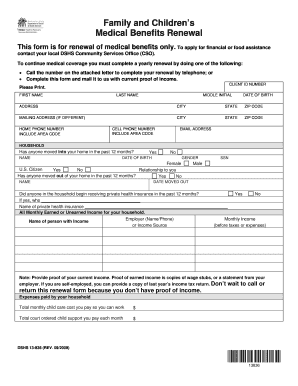
Family and Children s Medical Benefits Renewal This form is for renewal of medical benefits only. To apply for financial or food assistance contact your local DSHS Community Services Office CSO. Proof of earned income is copies of wage stubs or a statement from your employer. If you are self-employed you can provide a copy of last year s income tax return. Don t wait to call or return this renewal form because you don t have proof of income. Expenses paid by your household Total monthly child care cost you pay so you can work Total court ordered child support you pay each month DSHS 13-836 REV. To continue medical coverage you must complete a yearly renewal by doing one of the following Call the number on the attached letter to complete your renewal by telephone or Complete this form and mail it to us with current proof of income. CLIENT ID NUMBER Please Print* FIRST NAME LAST NAME MIDDLE INITIAL DATE OF BIRTH ADDRESS CITY STATE ZIP CODE MAILING ADDRESS IF DIFFERENT HOME PHONE NUMBER ....

How it works

  1. Open form

    Open form follow the instructions

  2. Easily sign form

    Easily sign the form with your finger

  3. Share form

    Send filled & signed form or save

How to fill out the WA DSHS 13-836 online

The WA DSHS 13-836 form is essential for renewing medical benefits. Completing this form online ensures a streamlined process to maintain your coverage each year. This guide provides step-by-step instructions to help you fill out the form accurately.

Follow the steps to complete the WA DSHS 13-836 online.

  1. Click ‘Get Form’ button to obtain the form and open it in the editor.
  2. Enter your Client ID Number in the designated field. This number is essential for identifying your case.
  3. Provide your personal information including your first name, last name, and middle initial in the corresponding sections. Ensure that all names are spelled correctly.
  4. Input your date of birth in the required format. This information helps confirm your identity.
  5. Fill in your current address including the city, state, and ZIP code. If your mailing address is different, provide that information in the next section.
  6. Complete the fields for your home phone number and cell phone number, including the area code. If possible, provide a reliable email address for communication.
  7. Indicate if anyone has moved into your home in the past 12 months by checking 'Yes' or 'No'. If yes, list their name, date of birth, gender, citizenship status, and relationship to you.
  8. If anyone has moved out of your home, check 'Yes' or 'No'. If applicable, provide the name, social security number, and date they moved out.
  9. Answer whether anyone in the household started receiving private health insurance, and, if so, provide the details of that person and the insurance.
  10. List all monthly earned or unearned income for your household. Provide the employer's name and phone number alongside the name of the person earning the income.
  11. Enter the total monthly income before taxes in the specified field. Be sure to gather proof of income as required.
  12. Report any expenses your household pays such as child care costs and child support. Fill in the amounts in the designated areas.
  13. Review the entire form for accuracy and completeness. Ensure that any required documentation proving your income is prepared to be submitted with the form.
  14. Once you have completed the form, save any changes, and choose to download, print, or share the form as necessary.

Complete your forms online today to maintain your medical benefits without interruption.

Get form

Experience a faster way to fill out and sign forms on the web. Access the most extensive library of templates available.
Get form

Related content

Superior Court 2000 Annual Caseload Report
... (DSHS), an agency, or a prospective adoptive parent. Termination - Petition for...
Learn more

Related links form

Pa Window Tint Exemption Form 2020 De 2500a Form Download 2020 Cs Form 101 D Revised Sept 2013 2020 Punjab National Bank Forms 2020

Questions & Answers

Get answers to your most pressing questions about US Legal Forms API.

Contact support

Applying for DSHS benefits in Washington is simple with the WA DSHS 13-836. You can complete your application online through their official website or visit a local DSHS office for assistance. Ensure you have all necessary documents ready to streamline your application process and expedite your benefits.

Reporting a change on the Washington Health Plan Finder is essential for keeping your coverage current. Visit the site, log into your account, and follow the prompts to report changes in your circumstances, as directed under WA DSHS 13-836. This ensures your health benefits stay aligned with your needs.

If you wish to file a complaint against the WA DSHS 13-836, you can do so by contacting their grievance coordinator listed on their website. They provide clear steps for lodging complaints, and every concern is reviewed promptly. It's important to document your complaint details to facilitate the process.

You can report changes to DSHS in Washington State via their online portal, which provides a user-friendly interface for updates. The WA DSHS 13-836 encourages individuals to report changes as soon as they occur, ensuring your benefits remain accurate. If you prefer, you may call their office for assistance.

To report changes to your Snap case under WA DSHS 13-836, begin by logging into your DSHS online account. You can enter updates regarding your financial or household situation directly on the platform. This ensures your benefits reflect your current status and prevents any disruptions.

Reporting a change to the WA DSHS 13-836 is straightforward. You can do this online through your client account on the DSHS website or by contacting their customer service. It's crucial to report any changes, such as income or household size, to avoid delays in your benefits.

To submit documents to the WA DSHS 13-836, you can use the online document submission portal available on their website. Alternatively, you may also mail your documents directly to the appropriate DSHS office. Ensure that all documents are signed and include any relevant case numbers for efficient processing.

The monthly income limit for food stamps, also known as the Supplemental Nutrition Assistance Program (SNAP), in Washington depends on household size. As of recent guidelines, households must meet specific gross income standards to qualify. For individuals seeking precise limits and additional assistance, WA DSHS 13-836 can provide detailed insights and support for your application process.

If you need to inquire about food stamps, you can reach the Washington DSHS office at 1-877-501-2233. This number connects you directly to representatives who can answer your questions or guide you through the application process. It’s essential to connect with them for assistance tailored to your needs related to WA DSHS 13-836.

Income limits for DSHS programs in Washington vary based on family size and the specific type of assistance requested. Generally, the guidelines assess gross income to determine eligibility for programs. For the most accurate and up-to-date information regarding these limits, it’s advisable to refer to WA DSHS 13-836. This resource can provide clarity based on your circumstances.

Get This Form Now!

Use professional pre-built templates to fill in and sign documents online faster. Get access to thousands of forms.
Get form
If you believe that this page should be taken down, please follow our DMCA take down processhere.
Get WA DSHS 13-836
Get form
  • Adoption
  • Bankruptcy
  • Contractors
  • Divorce
  • Home Sales
  • Employment
  • Identity Theft
  • Incorporation
  • Landlord Tenant
  • Living Trust
  • Name Change
  • Personal Planning
  • Small Business
  • Wills & Estates
  • Packages A-Z
  • Affidavits
  • Bankruptcy
  • Bill of Sale
  • Corporate - LLC
  • Divorce
  • Employment
  • Identity Theft
  • Internet Technology
  • Landlord Tenant
  • Living Wills
  • Name Change
  • Power of Attorney
  • Real Estate
  • Small Estates
  • Wills
  • All Forms
  • Forms A-Z
  • Other Templates
  • Legal Hub
  • About Us
  • Help Portal
  • Legal Resources
  • Blog
  • Affiliates
  • Contact Us
  • Delete My Account
  • Site Map
  • Industries
  • Forms in Spanish
  • Localized Forms
  • State-specific Forms
  • Forms Kit
  • Real Estate Handbook
  • All Guides
  • Notarize
  • Incorporation services
  • For Consumers
  • For Small Business
  • For Attorneys
  • USLegal
  • FormsPass
  • pdfFiller
  • signNow
  • altaFlow
  • DocHub
  • Instapage
Form Packages
  • Adoption
  • Bankruptcy
  • Contractors
  • Divorce
  • Home Sales
  • Employment
  • Identity Theft
  • Incorporation
  • Landlord Tenant
  • Living Trust
  • Name Change
  • Personal Planning
  • Small Business
  • Wills & Estates
  • Packages A-Z
Form Categories
  • Affidavits
  • Bankruptcy
  • Bill of Sale
  • Corporate - LLC
  • Divorce
  • Employment
  • Identity Theft
  • Internet Technology
  • Landlord Tenant
  • Living Wills
  • Name Change
  • Power of Attorney
  • Real Estate
  • Small Estates
  • Wills
  • All Forms
  • Forms A-Z
  • Other Templates
Customer Service
  • Legal Hub
  • About Us
  • Help Portal
  • Legal Resources
  • Blog
  • Affiliates
  • Contact Us
  • Delete My Account
  • Site Map
  • Industries
  • Forms in Spanish
  • Localized Forms
  • State-specific Forms
  • Forms Kit
Legal Guides
  • Real Estate Handbook
  • All Guides
Prepared for you
  • Notarize
  • Incorporation services
Our Customers
  • For Consumers
  • For Small Business
  • For Attorneys
Our Sites
  • USLegal
  • FormsPass
  • pdfFiller
  • signNow
  • altaFlow
  • DocHub
  • Instapage
Social Media
Call us now toll free:
+1 833 426 79 33
As seen in:
© Copyright 1999-2026 airSlate Legal Forms, Inc. 17 Station Street, Suite 303, Brookline, MA 02445
  • Your Privacy Choices
  • Terms of Service
  • Privacy Notice
  • Content Takedown Policy
  • Bug Bounty Program