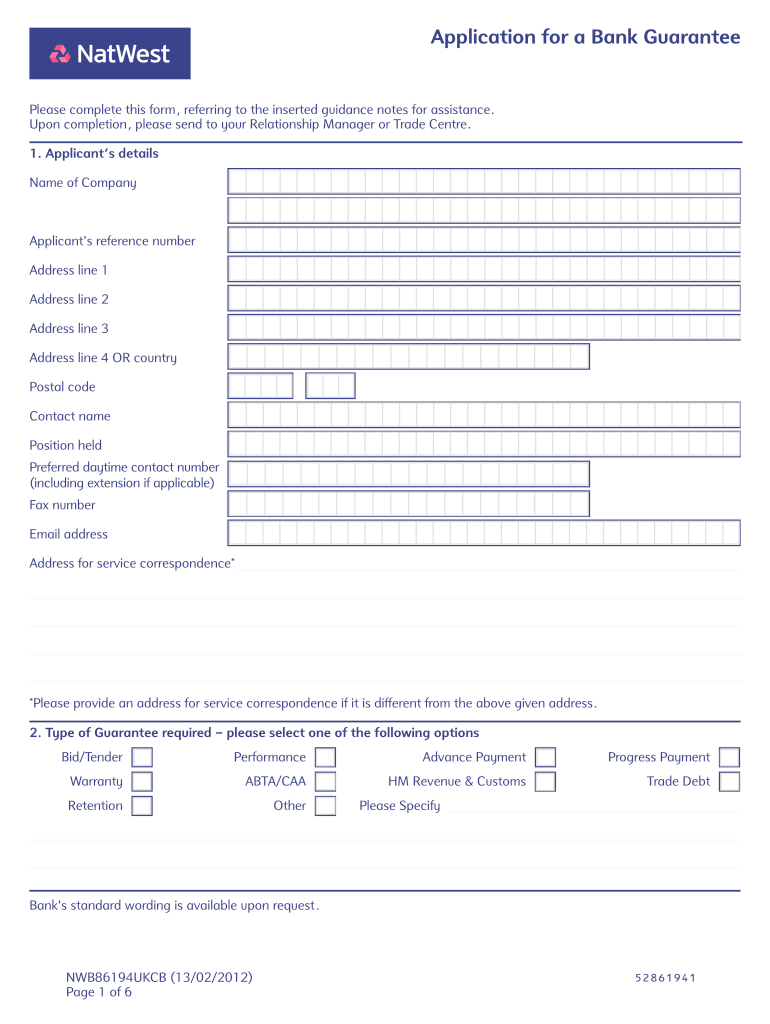
Application for a Bank Guarantee Pleasecompletethisform,referringtotheinsertedguidancenotesforassistance. Uponcompletion,pleasesendtoyourRelationshipManagerorTradeCentre. 1. Applicants details NameofCompany.
Loading

Open form follow the instructions

Easily sign the form with your finger

Send filled & signed form or save
How to fill out the Download The Bank Guarantee Application Form PDF - NatWest online
This guide provides a clear pathway to completing the Download The Bank Guarantee Application Form PDF for NatWest. Users will find step-by-step instructions to assist them in accurately filling out the form online.
Follow the steps to successfully complete the application form online.
- Click ‘Get Form’ button to obtain the application form and open it in your preferred electronic editor.
- In the 'Applicant’s details' section, enter the name of your company, reference number, and address. Include the preferred daytime contact number and email address for correspondence.
- Select the type of bank guarantee required from the options provided, such as Bid/Tender, Performance, Advance Payment, or others.
- Indicate the preferred method of issue, choosing between First Class Mail, Courier, or Registered/Special Delivery. Specify the recipient of the guarantee - whether it's for the applicant or another party.
- Choose the format of the guarantee by selecting either the bank's standard wording or providing an attached format. Ensure all details are complete and clear.
- Enter the guarantee amount in both words and figures, along with the relevant currency code.
- Fill out the beneficiary details accurately, including their name, address, and contact information.
- Provide a brief description of the goods or services covered by the guarantee, followed by the guarantee value percentage related to the full tender or contract.
- If applicable, complete the Bid/Tender Bond section by including the tender closing date.
- Add any expiry details relevant to the guarantee, specifying an expiry date or event if needed.
- Include any special instructions that need to be noted, ensuring they are comprehensive and clear.
- Fill out the account details section, including the Sterling account number and sort code, and specify how charges and payments should be handled.
- Carefully review the Bank Guarantee Agreement section, confirm the accuracy of the entered information, and sign the application.
- Finally, save your changes, download, print, or share the completed form as necessary.
Complete the application form online and ensure you submit it to your Relationship Manager or Trade Centre.
Experience a faster way to fill out and sign forms on the web. Access the most extensive library of templates available.
Related content
Sep 20, 2010 — Form FWP filed by Natwest Markets Plc with the security and exchange...
by E Whitehouse · 2000 · Cited by 29 — Indeed, many people form no expectations of...
Coutts & Co. /ˈkuːts/ is a private bank and wealth manager. Founded in 1692, it is the...
Get answers to your most pressing questions about US Legal Forms API.
How do I get a bank guarantee letter?
To request a guarantee, the account holder contacts the bank and fills out an application that identifies the amount of and reasons for the guarantee. Typical applications stipulate a specific period of time for which the guarantee should be valid, any special conditions for payment and details about the beneficiary.
How do I print bank statements from my phone?
Android mobile steps: In the upper right corner of the PDF Viewer, open the More menu (three vertical dots). Scroll down and select Print. Select a printer and choose from the options available, if needed. Select Print.
How do I download NatWest transactions?
Download the PDF of a Particular Transaction on Mobile Log in to your NatWest app. Select the account you want to view. Select the transaction you want a PDF for. Select 'Create PDF' - choose how you would like this to be saved and/or sent.
Can you download statements from NatWest app?
Statements are saved in the 'Statements' area on the left panel of your Online Banking. Select the 'View, save and print PDF statements and certificates of interest' option. You can also view your credit card statements in our Mobile App. Tap on your NatWest credit card in the app and select the 'Statement' option.
How can I get my full bank statement online?
To generate an account statement: Click My Accounts > Account statement. ... Select the account for which you wish to generate a statement. Select an option for the statement period. ... Select the start and end dates if you select the By Date option. ... Select an option to view, print or download the account statement.
How do I download my bank statement NatWest?
What you'll need Log in to Online Banking. Select 'Statements' from the main menu and then 'View, save and print PDF statements and certificates of interest (up to 7 years)' from the 'Your accounts' section. Select the account you want the statement for, and then 'Next'
How do I get a PDF of my bank statement?
How to download a bank statement pdf Visit your bank's website. Log in to Online Banking/Digital Banking/Internet Banking/eBanking etc. Click 'statements', 'e-documents', or 'download' Make sure you've selected the correct account. Choose a statement (or a date range) Choose the .pdf file format. Download*
How do I set up a bank guarantee?
How do I apply for a Bank Guarantee? The Favouree's legal name. The Favouree's ABN or ACN (if the Favouree is not an individual) The Bank Guarantee purpose. The Bank Guarantee expiry date. The Bank Guarantee amount.
Use professional pre-built templates to fill in and sign documents online faster. Get access to thousands of forms.
If you believe that this page should be taken down, please follow our DMCA take down process here.